- Type
- Audio Effect
- Author
- Because789
- Version
- 1.0
- License
- None
- Live version
- 9.0.6
- Max version
- 6.1.3
- Downloads
- 814
- Updated
- 2013-09-23
Delete Clips is an Audio Effect for Ableton Live by Because789, distributed as freeware, with no license specified by the author. It targets Live 9.0.6 and Max 6.1.3. On maxforlive.com it has 814 downloads. Published 2013-09-23. 1 user comment below.
New to Max for Live? Read what Audio Effects do, how device licenses work, how to install a device.
Description
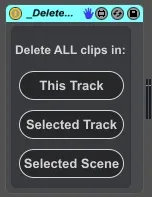
A simple utility to quickly delete multiple clips at once.
Features:
- delete all clips on the track the device is on ("This Track")
- delete all clips on the "Selected Track"
- delete all clips on the "Selected Scene"
If you map the buttons and they behave as toggles (first press deletes the clips, second press does nothing), which happens for example if you map them to your computer keyboard, you can simply open the device, select the three buttons together, open Inspector, change "Bang when transition from" to "Both" and save the device again.
USE WITH CARE!
Release notes:
----------------
v1.0
- initial release
Comments (1)