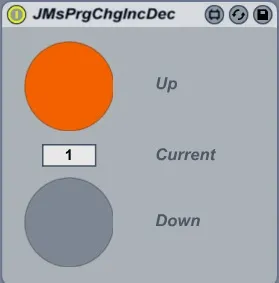
Program Change Increase - Decrease
Replaced by http://www.maxforlive.com/library/device.php?id=...
- Type
- MIDI Effect
- Author
- moss
- Version
- 1.0
- License
- None
- Live version
- 8.1
- Max version
- 5.1.7
- Downloads
- 1,392
- Updated
- 2011-03-22
Program Change Increase - Decrease is a MIDI Effect for Ableton Live by moss, distributed as freeware, with no license specified by the author. It targets Live 8.1 and Max 5.1.7. On maxforlive.com it has 1,392 downloads. First published 2010-02-03, last updated 2011-03-22. 5 user comments below.
New to Max for Live? Read what MIDI Effects do, how device licenses work, how to install a device.
Description
Replaced by http://www.maxforlive.com/library/device.php?id=512
The device sends midi program changes to the next device in the chain. There are buttons to decrease/increase the program change.
The idea is to load an instrument which reacts to program changes; by assigning the up/down buttons to a real button on your controller you can quickly change sounds.
Note: If you click the up/down buttons the program change inc/decrease by 2! This is required because the assigned real button only sends an on or off. If you don't like this behaviour change the button property "Bang when Transition from" from "Both" to "Zero->One".
Comments (5)
Similar comment to previous one.
The buttons have a double-strike problem -- both pressing and releasing the button increments/decrements.
This can be corrected by changing the parameter "bang when transition from" from "both" to "one->zero".
This system works great to rotate through the Presets on some of my VSTs and even one of my external synths, but I'd like to pick a CC value like #11 and be able to manually roll a pot to the value of my choosing, 0-127 (or customizable if a smaller range) for individual effects such as Reverb, or whatever else the external device will accept over MIDI.
Right now the only way I can do it is in Ableton through Automation clips, not realtime dial.
Thanks, if anyone knows what I'm looking for a way to adjust this plug-in to accomplish my goal (I'm not a Max programmer At Allll, btw). :)
Cheers,
Chris
Thanks