Master Live Select
Live Master Select is a simple utility that jumps the chain ...
- Type
- Audio Effect
- Author
- tomcosm
- Version
- 1.1
- License
- None
- Live version
- 9.1.2
- Max version
- 6.1.7
- Downloads
- 1,136
- Updated
- 2014-08-01
Master Live Select is an Audio Effect for Ableton Live by tomcosm, distributed as freeware, with no license specified by the author. It targets Live 9.1.2 and Max 6.1.7. On maxforlive.com it has 1,136 downloads. Published 2014-08-01. 1 user comment below.
New to Max for Live? Read what Audio Effects do, how device licenses work, how to install a device.
Description
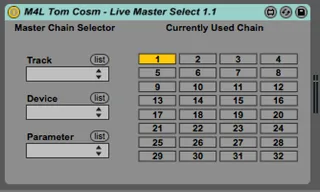
Live Master Select is a simple utility that jumps the chain selector of a mastering Audio Rack to a certain position depending on what clip is currently playing in a "trigger" track.
This is handy for switching mastering presets automatically between tracks during live performance for people who have different mastering configurations for each track they play.
Simply add a "trigger" MIDI track to your live performance template and add blank MIDI clips in the scenes where a new mastering chain is required.
The Chain Selector on the master track will jump to the position relative to the currently playing MIDI clip name.
For example, playing a MIDI clip called "6" in the trigger track will jump the chain selector on the master output to "6".
Comments (1)