Push-ArrangeMode
Push-ArrangeMode v2.1 gives your Push its missing Arrangemen...
- Type
- Audio Effect
- Author
- Crampe
- Version
- 2.1
- License
- Commercial
- Live version
- 10
- Max version
- 8
- Downloads
- 3
- Updated
- 2022-02-10
Push-ArrangeMode is an Audio Effect for Ableton Live by Crampe, distributed as a commercial (paid) device. It targets Live 10 and Max 8. On maxforlive.com it has 3 downloads. First published 2014-07-31, last updated 2022-02-10. 56 user comments below.
New to Max for Live? Read what Audio Effects do, what the Commercial license means, how to install a device.
Description
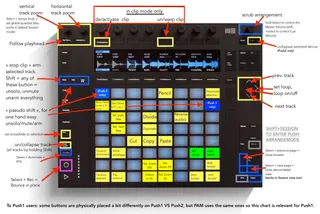
Push-ArrangeMode v2.1 gives your Push its missing Arrangement Mode. It doesn't interfere with other Push modes, it just adds a new one. It actually also adds a few features to Session mode.
The device mainly works on a "selected track" basis. Ultimately, the main goal of this patch is to use your mouse less, because for a lot of tasks this thing actually is... quite slow.
The main focus of this v2 was to add the most used keystrokes like copy/paste, but also new ones introduced in L10 like switching Content/Automation modes (A) or reverse audio (R), the new Live 10.1 zooming shortcuts (H, W, Z...), control over the Comping feature (L11) better control over playback modes and many more. And of course it keeps all the good features from v1 that are natively missing in Live.
It also now embeds a stripped-down version of my BiP (bounce in place) device.
Here's what you can do just from your Push with PAM v2.1 (most of these features are also key/midi mappable):
- un/fold selected track(s), or all tracks at once
- zoom vertically and horizontally with encoders/knobs
- new Live10.1 W, H, Z and X zoom shortcuts
- show/hide Takes Lanes
- move the selected clip to a new Take Lane
- scroll through Takes (cmd/ctrl + up/down arrows)
- set/display (cross)fades
- de/activate warp on audio clips
- reverse audio
- divide, cut, copy, paste, duplicate clips, tracks, devices.
- show/hide the detail clip Envelope tab!
- bounce in place
- mute/solo/arm individual tracks, and unmute/unsolo/unarm all tracks at once.
- set and de/activate the Arrangement and Clips loop brackets
- toggle on/off the arrangement « follow playhead» thing
- set and navigate locators
- equivalent to left/right arrow keys on your computer to navigate the timeline, move clips or midi notes etc...
- "continue playing" and "play selection" playback modes
- re-enable automations
- toggle between Content and Automation modes
- de/activate Draw mode
- set the global quantisation value
- focus/close the various panels (Browser, device/clip view)
etc...
PAM is 100% L11 compatible and works on silicon macs too.
Comments (56)
No, but I could add that quite easily. The thing is: you won't be able to edit in arrangement without your screen even if you had this timing information display. That would be a huge step backward in music creation/production ! That doesn't make a lot of sense IMHO. Push is way better that using any other controller or you mouse+keyboard to play with the session view, which is a kind of an "instrument" view. The arrangement is here to edit,arrange... and things that hugely benefit from a screen.
The idea of my device is to be able to leave the mouse + keyboard as more as possible in arrangement and use Push instead. But the screen is unbeatable for arrangement !
Thank you for the reply. I both agree with you and disagree with you.
There is still something in me that enjoys some aspect of the way I had to arrange using my old Korg Triton (maybe I am crazy). But I love being able to turn on the monitor, use my mouse and make fine adjustments for micro edit stuff.
I would love to see clips showing up horizontally in the arrangement view like they do vertically in the session view. As the arrangement plays, they scroll. You select a clip and hit duplicate it duplicates horizontally. You select a clip and hit delete, it deletes it. Etc etc. I think you get the idea.
I love the idea of not monitor for 80% of the work and being able to go over to the monitor and mouse when you really need to do some micro work or do some quick drag and drop.
I can dream. Either way, thanks for the reply.
Thank you for the reply. I both agree with you and disagree with you.
There is still something in me that enjoys some aspect of the way I had to arrange using my old Korg Triton (maybe I am crazy). But I love being able to turn on the monitor, use my mouse and make fine adjustments for micro edit stuff.
I would love to see clips showing up horizontally in the arrangement view like they do vertically in the session view. As the arrangement plays, they scroll. You select a clip and hit duplicate it duplicates horizontally. You select a clip and hit delete, it deletes it. Etc etc. I think you get the idea.
I love the idea of not monitor for 80% of the work and being able to go over to the monitor and mouse when you really need to do some micro work or do some quick drag and drop.
I can dream. Either way, thanks for the reply.
I just bought this device but having an issue.
I have added the device to my master channel and saved it to my default template.
The Issue is that the i need to click on the "init. patch" button on the device each time I load the template before the device will start working.
Is there any way to set it up that its active every time the template is loaded?
Thanks...
It is very useful apart from that, thanks very much.
It is very useful apart from that, thanks very much.
I would love it if some if all the buttons you have assigned were lit! I'm having a hard time remembering them, is it possible?
Also, scrubbing the timeline-what does it do? I was hoping it would start from where you leave it but it doesn't seem to work.
I am loving using your device though, I am writing songs using it and hardly touching the stupid mouse!
thanks for your great device, it really helps so much!
I have a problem since a few weeks, that can only be resolved by erasing the Pusharrangemode from my sets:
Every time i re-open a set with the pusharrangemode in the master channel all the tracks, also the ones that were muted, are unmuted again. That makes things sometimes a bit complicated, when working with a lot of tracks.
Can you change that behaviour?
Thanks
Cosmo
I recently got Isotonik Studios' PrEditor and I guess since it uses a separate remote script, Push-ArrangeMode doesn't work with it.
I don't know if you plan on supporting it but along with Push-Arrange they are the best 2 add ons for the Push. It would be great if they worked together.
Keep up the great work,
Thanks
thanks for the update.
I have a push 2 now, but since the layout of the push has changed lots of the keystrokes dont work anymore for me.
I cant even turn the device on and off.
Can you post a layout for the push 2, please?
In the update info there was only one for the push 1.
Thanks so much
People never come back to say "yeah it's fixed", because we usually talk through emails.
Just tested it out on Push 2 running Live 9.7.1 & Max 7.3.1 on Mac OS X 10.11.6 and **mostly* everything works, with a few issues. Figured I'd just post it here so everyone else can be in the loop as well.
Here is an image of most of what I'll summarize below: http://i.imgur.com/jjgo3Py.jpg
____________________________________________________
- Metronome knob controls horizontal zoom
- To set Global Quantization, you need to use SELECT + TEMPO knob, not SHIFT + TEMPO
- Fixed Length button is not Momentary Engage "Draw Mode" - it's Loop Toggle On/Off
- Duplicate doesn't actually do anything
____________________________________________________
Overall, it's a really handy little device. Thanks @Crampe for all the hard work you put into this! If we can just get these last few things fixed I think we'll be in good shape.
Is there a way to select different clips in Arrangement View? The toggle clip on/off works, but only if I've click a click first. There doesn't seem to be a way to select individual clips. Am I missing something?
I recently purchased this device and absolutely love it! I mostly work in arrange mode and it makes my Push2 so much more useful.
Question:
Are you still planning on updating it?
If so I was wondering if it was possible to have the arrow button step through the tracks by pushing left and right just like in session mode. Currently they are only dimly lit and do nothing on my push.
Also would it be possible to map the kill functions (mute, solo, arm) to dedicated pads on the push?
Thanks and keep up the great work!
Does this device still work with Push 2 / Ableton 10? I see that it is a bit older and hasn't been updated in some time.
Cheers.
Thanks!
I purchse the device and it not working entirely, like the divide copy paste not working, I got the push 2 and live 10.1, is there a reason why or am I doing it wrong.
Thanks
Sorry I didn't notice your message earlier.
Are you still having this issue?
In case, contact me via gumroad.
My fav M4L device, seems like functionality that should be included by default.
Feature request: Increase the scrub speed (volume knob) when holding shift.
The scrub just scrubs the whole arrangement, like a fast backward/feedforward.
- « fixed Length » button = un/fold selected track(s)
Comment; not working on selected track (tho Shift+ option works for all tracks)
- bottom middle yellow pads =
X and Z on the last row, W and H on top.
Comment; what are these shortcuts for?
- top left hand side corner greenish pad = « pseudo » shift >
Comment; this is only lit when active (no ‘standard’ colour)
Sorry for the delayed reply (I really hope maxforlive.com gets the notifcations sorted out one day!)
"- top left hand side corner greenish pad = ??pseudo?? shift >
Comment; this is only lit when active (no ?standard? colour)"
Yeah it's just a momentary equivalent of Shift, its only purpose is to get better access to Shift+Solo/Mute/Stop Push buttons to unsolo/mute/arm everything with only one hand.
"- bottom middle yellow pads =
X and Z on the last row, W and H on top.
Comment; what are these shortcuts for?"
These are zooming shortcuts that appeared with L10 (I suggest you to check the Live's manual/tutorials as they're one of the most handy shortuts)
"- ??fixed Length?? button = un/fold selected track(s)
Comment; not working on selected track (tho Shift+ option works for all tracks)"
Mmh... strange! Is it always the case, or was it within a specific set?
I bought your M4L Device with a few others :-) ) yesterday and struggle with some (if not the most :-( functions). Maybe I am using it wrong, but some of them are working as expected and the others are not.
I marked the non working ones with red "XXXXX"s. See here:
https://imgur.com/a/YK0yzty
I am using "Live 10.1.25" so that should not be the problem.
Please help me
Thank you in advance
Jan
bought yesterday and I think I experienced same issues. My default keyboard is Czech (QWERTZ), I tried to switch it to English US (QWERTY) and suddenly all shortcuts on push started to work. What is weird.. since then everything works fine also with Czech keyboard, so maybe I'm wrong. Test it and you will see.
@Crampe good job. Thank you :-)
Sorry I'm only noticing your message now (that f*ucking old maxforlive.com isn't sending me any notifications).
Please email me by answering to the gumroad email you got when you purchased the device, if you haven't already.
@emmanuel666 thank you!
it doesnt look like there's official live 11 support, and i'm not sure if you intend to update any time soon. this was the best place i could find to submit a bug report.
in my experiences with live 11, this device will properly initialize on one project per instance of ableton. if i load it in one project, i cannot open another save and load it there - the device will do nothing. the first time i load this device in a single instance of ableton is the only time the device will work, and it will continue to work until i load another ableton project. it does not need to be on the first project loaded in order to work, it just needs to be the first time it was initialized within that instance of live 11.
for my current workflow, this doesnt present much issue, but i imagine it could be a deal breaker for some.
That's weird, I never experienced this nor get any report like this.
The device is officially L11 compatible.
What's your OS, Live and Max versions?
Does clicking the "init. patch" button on the bottom right-hand side does solve the problem for you?
live: 11 suite (max for live built-in)
clicking init. patch doesnt do anything. all of the other buttons on the max device function properly, but functions mapped to the push 2 are not available.
it's probably a niche bug happening on my end. if you get more reports in the future and want to pursue more information for this case, i'll be happy to gather more.
Please contact me by answering to the Gumroad receipt email. It'll be easier to communicate ;-)
No problem here with L11.1, but I'm still on an Intel mac. Are you using a silicon mac?
that's probably because you're using the Apple Silicon compatible version (PAM v2.1). Since you're running in Rosetta, please try the previous PAM v2.0 version and let me know if it solves your issue.
Can your device follow the timeline in arrangement view like in clip view? something like that: https://imgur.com/oOWJHUc
just FYI, I'm running the latest version of live 11.2 on mojave.
Thank you.
"follow the timeline"?? Do you mean on Push's screen? Like a having the Arrangement Overview displayed on the screen?
In this case the answer is no.
I have a suggestion to let user control the loop using two knobs to move and resize loops, ie.
1. One knob to move the loop back and forth in the timeline
2. Another knob to resize the loop
I believe the ability of looping parts of the arangement is an important process when one wants to refine that specific part of the song.
Sorry for the belated answer.
These are things I remember trying to implement, but I think I did hit a wall because of something not behaving as expected... but that was a long time ago I can't remember exactly.
I'll make sure to look at it again once I'll start working on the next update.
cheers!
Also the button combination to switch arrange view also triggers the save function for the project (which isn't a bad thing actually but probably not intended). Everything else seems fine so far.
And while we're at it, will PAM be available on the Push3?
Keep up the excellent work! Cheers!
Yes, an update for L12 will be available for its release (or a bit before can fight my laziness!). It mostly works though with the latest PAM version, but since Live/Push is now using Shift+Session to save a set this is breaking the mode switching of PAM.
A P3 version is also on the way.
Thanks for your quick response. Great to hear updates for both are coming!
After playing around with PAM in L12 a bit more I found a bunch of other stuff not working either.
So this is awesome and greatly appreciated!
No rush or anything, take your time.
I'll just sit here patiently hitting refresh.
I was looking to purchase this but noticed it's still not compatible with L12. Is this still going to happen and is there an approx date.
Thanks
Sorry for the delay @ everyone.