- Type
- Audio Effect
- Author
- dataf1ow
- Version
- 1.0
- License
- Attribution
- Live version
- 9.1.2
- Max version
- 6.1.7
- Downloads
- 1,045
- Updated
- 2014-08-22
LaunchSlide is an Audio Effect for Ableton Live by dataf1ow, distributed as Creative Commons Attribution. It targets Live 9.1.2 and Max 6.1.7. On maxforlive.com it has 1,045 downloads. First published 2014-08-10, last updated 2014-08-22. 11 user comments below.
New to Max for Live? Read what Audio Effects do, what the Attribution license means, how to install a device.
Description
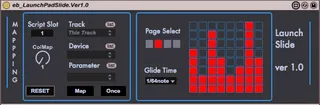
This device turn your launchpad User 2 mode into 4 banks of eight sliders to control Rack Macros throughout your set.
There is a mapping section to the left with a few different options. You can select via the menus, or turn 'Map' on to click macros and automatically map them.
You can use multiple instances of this device to get more than 1 bank, which are assigned to the arrow keys on the launchpad. Each page has it's own color.
You can use this with multiple launchpads, by selecting the appropriate script slot.
You can adjust the glide time with the eight scene launch buttons.
Currently, this works on macros only, but I will soon open it up to all parameters.
Enjoy!
Comments (11)
Let me know if it looks a bit better now.
-E
I try it with a launchpad S and the last Version of Ableton/Max but it not really works. I can only change the glide time.
Need help:)
I have a Launchpad 1 and a new Launchpad RGB; you're device is recognized by the old Launchpad, but not the new one. I went through the script slots, but the RGB Launchpad doesn't recognize your cool device. Do you have any ideas about how to correct this?
Thanks!
I have a Launchpad 1 and a new Launchpad RGB; you're device is recognized by the old Launchpad, but not the new one. I went through the script slots, but the RGB Launchpad doesn't recognize your cool device. Do you have any ideas about how to correct this?
Thanks!