- Type
- Audio Effect
- Author
- veedjee
- Version
- 1.1
- License
- AttributionNonCommercialNoDerivatives
- Live version
- 9.1.5
- Max version
- 6.1.8
- Downloads
- 930
- Updated
- 2014-12-13
Scene Control is an Audio Effect for Ableton Live by veedjee, distributed as Creative Commons Attribution-NonCommercial-NoDerivatives. It targets Live 9.1.5 and Max 6.1.8. On maxforlive.com it has 930 downloads. First published 2014-10-06, last updated 2014-12-13. 3 user comments below.
New to Max for Live? Read what Audio Effects do, what the AttributionNonCommercialNoDerivatives license means, how to install a device.
Description
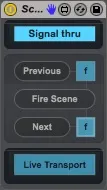
Here is a simple but useful device to navigate scene.
- Select previous scene
- Fire selected scene
- Select next scene
- Live's transport toggle
- Signal thru toggle (audio & MIDI)
- Choose to launch the scene when selecting previous/next scene.
All buttons are MIDI mappable
Check my others Device :
http://www.maxforlive.com/library/index.php?by=any&q=veedjee
If you use it, rate it, Thanks !!
Comments (3)
I just map "fire scene" into a midi note from my pad controller. But it olny works every two times I press the pad, and I don't undartand why. What am I doing wrong?
Thanks!!