- Type
- MIDI Effect
- Author
- veedjee
- Version
- 81.1
- License
- AttributionNonCommercialNoDerivatives
- Live version
- 9.1.5
- Max version
- 6.1.8
- Downloads
- 20,581
- Updated
- 2014-10-22
CC map is a MIDI Effect for Ableton Live by veedjee, distributed as Creative Commons Attribution-NonCommercial-NoDerivatives. It targets Live 9.1.5 and Max 6.1.8. On maxforlive.com it has 20,581 downloads. First published 2014-10-07, last updated 2014-10-22. 16 user comments below.
New to Max for Live? Read what MIDI Effects do, what the AttributionNonCommercialNoDerivatives license means, how to install a device.
Description
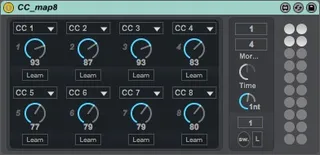
CC map8 is a bidirectional CC controller to control your hardware with CC messages.
Quick tips :
- Set the device on a MIDI track
- Arm the track and set the MIDI input and output in the Live i/o section.
Functions :
- Midi learn fonction to map easily your controller to the device.
- CC menu to select the CC manually.
- Preset section, (maj+click on circle to save)
- Morph preset, select the 2 presets do you want morph between and move the "morph" Dial.
- "Switch" button to automate morphing.
- Adjust morphing time and Loop morphing.
Update 1.1
- Set the Dials 1-8 to be the first parameters with Push/APC40
Please, if you use it, rate it, Thanks !!
Check my others Device :
http://www.maxforlive.com/library/index.php?by=any&q=veedjee
Comments (16)
Thanks for comment. I take your comments into consideration for a future update soon.
Dials should be now the first controllers with Push/APC
If you are interested please contact me on vjsynth (at) gmail (dot) com
Thank you in advance :)
However...
I'm using 4 instances, each in their own group with macro knobs assigned to each CC value. But it seems only one instance can be used at one time.
For example, there are 4 groups labeled A,B,C and D (from left to right) each containing an instance of CC map8. In this configuration A, B, and C will not be able to control the midi assigned. Only D will be able to control. Disabling group D will allow C to function, but A and B will still not work.
Just curious if I'm doing something wrong, or is this just the way it works.
Thanks!
I wanted to let you know that I have been using your plug in for a few years now and it has been really great! However, I just updated to the latest version of M4L, and all of the saved automation lanes associated with this plugin get deleted with the update. The plugin still shows up on the tracks, but there is no longer any automation curves. I reverted to the older version of M4L and the curves come back. I am using another CC sender plugin by a different author and those curves don't get deleted with the update. Let me know if you want any other information to help debug this. Thanks again!
As the blue preset light jumps around, the values immediately jump to that preset, resulting in wild knob movements.
"Dial 1" , "Dial 2" etc is not very useful!
I tried to edit the Plugin in Max so that I could rename the knobs and try to hide the other controls from Push but it seems to be locked so I cannot change anything.
Thank you. I don't understand why Live doesn't have MIDI CC knobs included in the MIDI effects.
I'm using it simply to control the modulation wheel as I don't have any hardware with a modulation wheel..
I'm unable to "re-enable automation" after recording it. The red dot above the knob indicating that the knob is modulated is now white. ...
I made sure there are no automation in my clip view but still, I can't re-enable automation.
Can you guys help? Thank you !
Thanks for this device. I'm using it to control my external midi instrument but when I put it in an instrument rack and assign macros to the parameters, it's no longer working bidirectionally. No matter what midi CC I send to the device in the rack, it just forwards it to its output but it doesn't change its knob values. Any ideas?
Thanks! Keep up the good work.