- Type
- Audio Effect
- Author
- blindeQ
- Version
- 22.9
- License
- AttributionNonCommercialShareAlike
- Live version
- 9.7.7
- Max version
- 7.3.4
- Downloads
- 15,061
- Updated
- 2018-10-25
Oscilloscope V is an Audio Effect for Ableton Live by blindeQ, distributed as Creative Commons Attribution-NonCommercial-ShareAlike. It targets Live 9.7.7 and Max 7.3.4. On maxforlive.com it has 15,061 downloads. First published 2014-12-17, last updated 2018-10-25. 18 user comments below.
New to Max for Live? Read what Audio Effects do, what the AttributionNonCommercialShareAlike license means, how to install a device.
Description
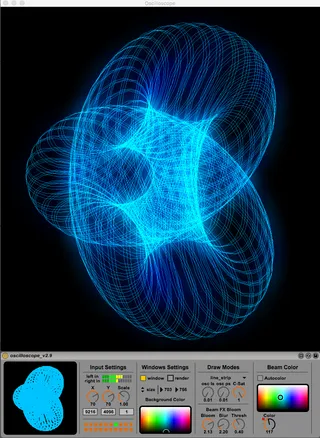
M4L Oscilloscope v2
Analyze and Visualize Audio Signals.
Use the devices after Instruments/Audiosignals etc. or put it in the Master Channel.
You need an Audiosignal source like a Synthesizer, Sampler,etc.
Oscilloscope Features:
+ XY Oscilloscope
+ Separate Window (custom size)
+ Changeable Drawmodes and other features
+ Custom options
+ Preset Bank
+ Supports HW Rendering and Anti-Aliasing
Sylenth1 (3.0) - Preset Bank Oscilloscope_V1
https://www.dropbox.com/s/q5nsgac73zbmoz8/Oscilloscope_V1.fxb?dl=1
some screenshots:
https://picload.org/image/rgpiowrw/screen_shot_1.png.png
https://picload.org/image/rgpiowdr/screen_shot_1.png
Comments (18)
I guess of course one could just go in and change the color easily.
the font color thing is fixed now.
I have two instruments (channels) in Instrument Rack, but have no idea how to redirect them to "left in" and "right in" inputs.
Thanks for your work :)
i will implement this idea an fix some of the bugs.
please rate this patch :)
for example: use a synth with 2 osc´s and set osc1 to the left audio chanel and osc2 to the right audio channel. change the phase of one of the osc´s to 90 degree
if you use a sinewave on each osc you will see a nice round circle
checkout some videos from Jerobeam Fenderson:
https://www.youtube.com/watch?v=rtR63-ecUNo
or checkout some of his max patches here on maxforlive:
http://www.maxforlive.com/profile/user/sternmull
It isn't active. Thank's in advance!
in the new version there is an dial to change the color too.
(at this time i was not able to implement the lightness dial to get working. if someone know a solution please contact me. thx)
@Kuzma
at this time i was not able to find a solution to implement this feature, so i deactivated the window when loading the max patch.
you have to turn it on if needed.
the link to the sylenth1 preset bank list online now
please rate this patch :)
Just want to say thank You for this device!
When I use the scope to full screen,the movement is laggy,no matter how I set up the frame rate etc,is it a bug,or can I set up anywhere the full screen option?
Thanks!
How can I fix this?
Thanks so much for this device.
I had so much fun the other night, when I finally got this to work on my mac and my brain to understand how it worked.
It´s really cool but I can´t seam to find a way to record a video of it.
I thought that I could do it over Syphon but it doesn´t see the Oscilloscope window, so I tried to use a NDI Scan Converter but it only sees the Ableton session window and not the Oscilloscope Window.
Anyone with a solution to this problem? or idea for a workaround?
Thanks
Ringo
you can try to use quicktime to create a video. very easy to use.