- Type
- Audio Effect
- Author
- cphas
- Version
- 1.0
- License
- None
- Live version
- 9.1.6
- Max version
- 6.1.9
- Downloads
- 697
- Updated
- 2015-01-01
XFadeMap is an Audio Effect for Ableton Live by cphas, distributed as freeware, with no license specified by the author. It targets Live 9.1.6 and Max 6.1.9. On maxforlive.com it has 697 downloads. Published 2015-01-01.
New to Max for Live? Read what Audio Effects do, how device licenses work, how to install a device.
Description
I often find Live's MIDI mapping system somewhat limited. Nowhere is this more true then when trying to MIDI map the crossfader assignment buttons.
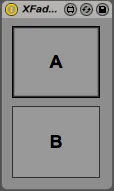
This is a very simple device that uses the Live API to provide to button that can be MIDI mapped separately in order to control the crossfader assignment of the host track (the track does not have to be the canonical parent of the device, yo can nest it within chains etc.) Thus you can use two buttons (such as those found on the Allen & Heath K2 for example) to directly select the side of the crossfader you want the track to be on.
Hope you find this as useful as I have :)