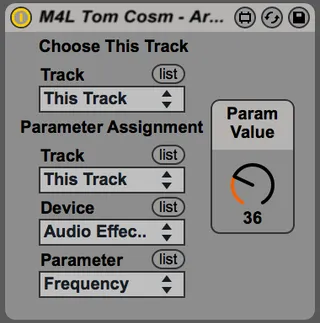
Armed Track Parameter Gate
This device allows you to control several parameters with a ...
- Type
- Audio Effect
- Author
- tomcosm
- Version
- 1.0
- License
- None
- Live version
- 9.1.6
- Max version
- 6.1.9
- Downloads
- 796
- Updated
- No Updates
Armed Track Parameter Gate is an Audio Effect for Ableton Live by tomcosm, distributed as freeware, with no license specified by the author. It targets Live 9.1.6 and Max 6.1.9. On maxforlive.com it has 796 downloads. Published 2015-01-03. 2 user comments below.
New to Max for Live? Read what Audio Effects do, how device licenses work, how to install a device.
Description
This device allows you to control several parameters with a single knob, but only changing the parameters on the current armed track.
An example of how this would be used :
Having the same effect on several tracks, with a knob controlling the same parameter for each effect, but only having the effect on the arm track being modified, allowing you to quickly switch where the knob is being sent.
For a more detailed explanation please watch the following video - http://youtu.be/01HD_55RVOs
Comments (2)