- Type
- MIDI Effect
- Author
- negotiator
- Version
- 1.1
- License
- AttributionShareAlike
- Live version
- 8.1.3
- Max version
- 6.1
- Downloads
- 3,814
- Updated
- 2013-04-12
Preset Mapper is a MIDI Effect for Ableton Live by negotiator, distributed as Creative Commons Attribution-ShareAlike. It targets Live 8.1.3 and Max 6.1. On maxforlive.com it has 3,814 downloads. First published 2010-06-29, last updated 2013-04-12. 21 user comments below.
New to Max for Live? Read what MIDI Effects do, what the AttributionShareAlike license means, how to install a device.
Description
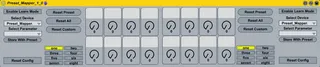
Preset Mapper, a device parameter mapping & snapshot tool
(post last updated on 01.07.2010, 23:20 GMT)
(!SIC: this device is no longer maintained)
Key features:
*easy to use, midi, key & mouse mappable interface
*supports automap feature
*8 different presets, every preset has a set of 8 macros
*8 macros, which you can assign to any other macro inside your set
*bidirectional mapping:
-the original parameters, which we bind TO, can be freely modified by any other means/devices, changes are updated in the preset mapper and vice versa
*3 different,assignable reset to snapshot values per macro:
-reset the current active 8 macros (reset current preset)
-reset all assigned macros (reset macros in all presets)
-reset custom macros
*Reset configuration:
-set the snapshot values for the 3 different resets
-disable any kind of reset for any macro
*all the above mentioned *2
-two INDEPENDENT sets of 8 macros with INDEPENDENT presets & resets == 16 highly customizable macro bindings & snapshot values
*structured, easy to read code for self modifications:
-dial control over current active preset is already implemented, you just have to make some minor changes to be able to midi map it
*mappings & snapshot values are saved when you save your live set!
Notes:
Pickup mode (in the midi control surface configuration) is not supported. Please choose "Value Scaling" or "None" mode.
If you dont want 2 sets of knobs, just delete the duplicated part in the device (right side inside patcher).
If presets arent loaded correctly after loading a prior saved live set, just hit play and everything should be fine.
Live can crash when you drag more than 1 copy of this patch into your live set, weird bug...
This device is inspired by the clip mapper http://www.maxforlive.com/library/device.php?id=259 , the snapshot morpher http://www.maxforlive.com/library/device.php?id=320 from the covertoperators and the control surface by S4racen http://www.maxforlive.com/library/device.php?id=115
Based upon the clip mapper, many many big thanks for sharing to thecovertoperators and their staff!!!!
Comments (21)
If you right click inside the device when in edit mode and select parameters, every parameter will have a number....
Simply number the first 8 dials 1 - 8 and the 2nd set of 8 9 - 16 with any other parameter ensure their number is 17 or higher (i set all of mine to 99) and then you'll get the blue hand mapping with two banks of controls....
Great device by the way!!
Cheers
D
thank you very much for the tip!! , glad you like it :)
Cheers
D
i made some modifications so that you dont have to press them twice with midi!!!!(by emulating a toogle off)
it should work the same way with keys
i have been looking for something like this for a while!
@beatskk:
3) i didnt add buttons as there would be too much elements on the screen, but with 16 knobs you are more flexible imo
-> you can emulate every button with a macro thats mapped to it (right click on your device -> group device -> and now map one macro of the newly created device to a button you want to control)
1) hmm i could add a feature that maps all the macros of the selected device, you could also manually click on every macro!! :)
2) ah i see; good point; i could add a feature which resets all macros when remapping, otherwise macros of the currently active preset should not be erased
thx beatskk for your suggestions, i will see what i can do, i dont think that it will be hard to make these changes!
This is officially my favourite m4l device, hands down.
I've set it up to interact with a small devices of my own. Works great, so I thought I'd let you know what i'm doing, in case you want to incorporate it in your device.
Basically it's just a quantize device so I can reset values "on beat", which is pretty sweet when dj'ing. It enables me to mash up all the values, press reset and on the next bar the signal is clean (actually, a 32th before the 1 beat, to ensure that the "punch" isn't swallowed).
i also had an idea to have a small fader next to each dial, center should be linear value, left should be slow ramp exponential, right for fast ramp values. hope this makes sense.
The scale object can do the slow ramp easily, but needs some fiddeling to do fast ramp. Alternatively there is a great simple external called mapper:
http://web.media.mit.edu/~tristan/maxmsp.html
just some ideas, keep up the great work.
This very nice looking device keeps crashing on both my pc's. It loads fine, but when I start switching between presets, the preset buttons (one, two, etc.) start flickering and switching. After that Ableton crashes. Anyone knows why this happens? Thanks!
Greetings, M
Because I'd like to do this :
having different synths in my set, with the presets changing for different tracks, and when I change a preset on the synth that is inside a rack, the macro doesn't change !
flickering and switching ...
in a live set which includes a simple delay and the present mapper device.
Ableton 8.2.2. and Max 5 45300 update
MFG J3H
I try to midi-map all the 16 knobs to my extern midi-device but my extern midi-device only finds the first 8... I have tried to follow the instructions described longer up. I dont understand the problem... it looks like the preset mapper dont send any midi signals from the last 8 knobs... only the first 8.
Plx! Help me :(((( I rly want this to wurk! :)
Been searching for something like this for quite some time, now I'm really happy I can finally have preseted fader knobs.
Sometimes I just turned the knobs too fast so it would get stuck, but I can totally live with that!
This is awesome!
Thanks again!
Unfortunately, I have stopped maintaining this device some while ago. You are free to modify it to your needs.
example:
macro 1 reverb
macro 2 pitch shifter
macro 3 delay
macro 4 saturation
macro 5 EQ
macro 6 Filter
when i play some sounds I end up using all of them and when I want to play back another set of sounds,(to start with a dry signal) i have to move all knobs to its start position...
I need a macro controll to RESET all at once
is it possible?
thanxxxx so much,, regards from Queretaro Mexico