SessionSceneLauncher
Use this device to control the Session View of a Control Scr...
- Type
- MIDI Effect
- Author
- dataf1ow
- Version
- 1.0
- License
- None
- Live version
- 9.1.6
- Max version
- 7.0
- Downloads
- 1,262
- Updated
- 2015-03-05
SessionSceneLauncher is a MIDI Effect for Ableton Live by dataf1ow, distributed as freeware, with no license specified by the author. It targets Live 9.1.6 and Max 7.0. On maxforlive.com it has 1,262 downloads. First published 2015-03-02, last updated 2015-03-05. 7 user comments below.
New to Max for Live? Read what MIDI Effects do, how device licenses work, how to install a device.
Description
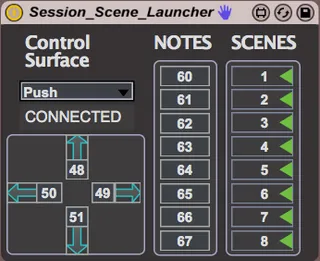
Use this device to control the Session View of a Control Script from another MIDI controller. Originally designed with foot controllers in mind.
Place this on an empty MIDI track, and then select the control surface you wish to interact with (if you have a controller that doesn't appear there let me know and I'll add it!).
Define the notes you wish to launch scenes, and navigate the session, or MIDI map notes to any of the controls.
Plug in a MIDI controller, send the notes, and you're good to go!
A note for PUSH users: Since the SessionComponent isn't created until you enter session mode on the Push, it will not connect until you hit the 'Session' button.
A Note for MIDI mappers: For some reason if you launch a scene with this device, then enterr MIDI mapping mode you won't be able to select controls on the interface. Simply click on the device title bar to get them functioning again. I'm working on this bug.
If you'd like to use any controller to fire scenes, and you don't have a devive with a control script you can download my 'Session_Box' script from github here: https://github.com/dataf1ow/Session_Box
Comments (7)
Little confused from your requests. The Push already has a redbox, so I'm not sure what you're asking for. It also has scene launch buttons on it. Or are you trying to use the Push script without a Push?
Feel free to email me at [email protected]