Push Snap n Scale
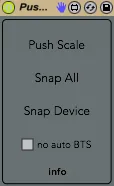
Push Snap n Scale uses Clyphx to add 2 features to Push: ...
- Type
- Audio Effect
- Author
- Crampe
- Version
- 1.0
- License
- None
- Live version
- 9.1.7
- Max version
- 6.1.9
- Downloads
- 670
- Updated
- 2015-03-15
Push Snap n Scale is an Audio Effect for Ableton Live by Crampe, distributed as freeware, with no license specified by the author. It targets Live 9.1.7 and Max 6.1.9. On maxforlive.com it has 670 downloads. Published 2015-03-15. 2 user comments below.
New to Max for Live? Read what Audio Effects do, how device licenses work, how to install a device.
Description
Push Snap n Scale uses Clyphx to add 2 features to Push:
1- Storing scales in clips. It means you can use a different scale for every clip in the same Live Set.
2- Taking and storing snapshots of one or every devices of the current track in clips.
You need to have Clyphx (2.4.7 or higher) installed.
http://beatwise.proboards.com/thread/992/current-version-clyphx-live-8
More info on my website, and in the device.
Ciao
Comments (2)
I noticed a bug: every time you try to cap a device that is already selected it will cap all the devices in the track. It works only if you cap a device that is not selected. Could this be fixed!
Cheers!
I'll have a look into that, but not sure when...
Cheers
J.