- Type
- MIDI Effect
- Author
- jonbenderr
- Version
- 1.0
- License
- None
- Live version
- 9.1.6
- Max version
- 6.1.9
- Downloads
- 532
- Updated
- No Updates
KeyMapper is a MIDI Effect for Ableton Live by jonbenderr, distributed as freeware, with no license specified by the author. It targets Live 9.1.6 and Max 6.1.9. On maxforlive.com it has 532 downloads. Published 2015-03-27. 1 user comment below.
New to Max for Live? Read what MIDI Effects do, how device licenses work, how to install a device.
Description
A simple way to remap the range of pitches available.
While messing with various generative tools, I always run across the problem of pitches being very high and unpleasant, or too low and inaudible.
I also have a very small control keyboard. (LPK25)
This helps in those situations and maybe others.
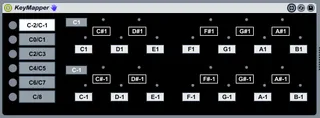
Bring the target octaves into view with the tabs on the left.
You can then remap the entire octave using the gray box denoting root octave note, and than adjust individual pitches of the octave using the boxes that mimic typical key/piano layout.
(Note: Modifying root octave note will reset all notes of the octave to their corresponding values. Always adjust octave first.)
There are blinking lights everywhere to let you know where you are. Follow them. They will help.
Any issues or bugs with ANY of my devices, PLEASE let me know.
Comments (1)