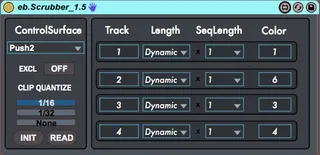
eb.Scrubber
1.5 Update: Added Exclusive mode. When you trigger any of th...
- Type
- MIDI Effect
- Author
- dataf1ow
- Version
- 1.5
- License
- AttributionNonCommercial
- Live version
- 9.5
- Max version
- 7.0.6
- Downloads
- 3
- Updated
- 2015-11-23
eb.Scrubber is a MIDI Effect for Ableton Live by dataf1ow, distributed as Creative Commons Attribution-NonCommercial. It targets Live 9.5 and Max 7.0.6. On maxforlive.com it has 3 downloads. First published 2015-07-16, last updated 2015-11-23. 78 user comments below.
New to Max for Live? Read what MIDI Effects do, what the AttributionNonCommercial license means, how to install a device.
Description
1.5 Update: Added Exclusive mode. When you trigger any of the tracks, the others stop.
1.4 update!!! Modified to work with 9.5 and the new Push 2 Hardware!!!!
The eb.Scrubber device leverages the new API calls we got in Live 9.2, most importantly the 'Scrub' Call. This allows us to jump around audio and midi clips freely, without ever getting out of sync. Scrubber dynamically grabs the playing clip in the assigned tracks and divides it up into 16 sections.
Now, imagine, seamless hardware control and feedback from two of Live's most popular controllers, Push, and Launchpad. Add some pattern recording and some stuttering, without ever losing any core functionality, and you have a powerful production and performance tool.
Check out the demo videos:
https://www.youtube.com/watch?v=bIB4cKBlNok
https://www.youtube.com/watch?v=uVSenhHaaDk
Control Surfaces Supported:
PUSH
PUSH 2
LaunchPad
LaunchPad Pro
QuNeo
Comments (78)
Thank you for sharing!
I'll do some more testing after the weekend & will let you know
@AuralBee: Yeah if you can give me EXACT repro steps that will help me troubleshoot. It's hard for me to fix a bug that I don't see. You may have to reselect the tracks, or play the clips again in Session Mode.
normal mode works, then after switching to stutter mode by enabling the lower scene button, i hold down a button and nothing happens
am i doing it wrong?
Thanks so much for the update, and workaround!
The lights do their walk following the track's playhead, and the quantize buttons works, but the main buttons to "scrub" the clip don't do anything.
I have OSX 10.6.9, Ableton 9 and Max 6.1
I opened the device and tried to debug it: The messages from the buttons do their way through untill they become "call scrub x", but I don't know if the live.object is set correctly, because it doesn't react to that message. I think. Please help!
That sounds like you don't have the latest version of Live installed, 9.2. The scrub call wasn't made available until 9.2. Update to the alteset version of Live and Max, and let me know how it goes.
I find that sometimes the playhead scrub moves only with the note-off message, or maybe its catching the next 16th note when quantization is on? Whatever it is, it felt a bit disconcerting. But in most cases I couldn't retrigger or move around the clip nearly as nimbly as you did. And sometimes it feels like I loose responsiveness to the clip altogether, maybe at a bar's launch resolution at best.
I wish I could articulate the grey area of my interaction with it a bit better for you; I just couldn't put my finger on what was loosing focus, what was loosing responsiveness...my timing is pretty good.
Also, could you remind me of the key combination for picking up on the downbeat with the other tracks? I couldn't see this behavior difference acknowledge on the patches interface while using a Push.
Cheers for making this! I hope I experience enough stability with it that I can soon incorporate it into my performance template...
You can switch to global mode by hitting the 'Undo' button on the Push. This is in the readme accessible from the 'READ' button on the device's UI.
As for the lack of responsiveness, that might have to do with your particular setup.
What's your buffer size and latency?
What soundcard are you using? What is your OS?
As you can see in the video, the patch itself is quite responsive, and I am able to trigger things quickly and accurately. It might be some particular settings you need to tweak.
Yeah, I wish I could point to those things, but my clip launch resolution, my buffer size and resulting latency are well below 10ms if not measured in samples. I do plenty of live performance moves that are timing and syncopation critical.
When it falls off it's responsiveness it really feels like the control is on the 1-bar level for some reason, or that the scrub location is dependent on the note-off location of a track with a note length device stuck on it. I just can't describe or isolate it, it's just too weird.
The only thing I can think of is that I've assembled some python adaptations that send clip launch with some velocity sensitivity on the PUSH for example, and allow velocity values on the drum rack step sequencer. But that's just a wild guess.
Remove ALL devices/python scripts that might interfere with clip quantization. Just use this device and a few audio clips.
There is some weirdness that can happen if your start marker doesn't start at the beginning of the clip. Make sure that the start marker is at the beginning of the clip. If this isn't the case, some of the math in the device gets a little confused. This is in the works for a fix, but for the time being, you'll need to have the start marker at the beginning of the clip.
I hope this helps uncover the responsiveness issue!
Did you design ebscrubber to automatically be in ram mode?
I also thought that with the new live 9.2 release you could toggle ram mode from m4l?
This seems to be broken right now and I am working on a fix as we speak.
What do you mean it isn't working at all? I'll need some more info than that if I need to fix a bug.
LEDs not working?
Clip chopping not working at all, or not as expected?
Etc. etc.
The trouble is Live crashes if you try to record audio into a track that eb scrubber is currently controlling. Do you want me to send you the crash report? thanks again!
Let me know if it's fixed on your end.
I would definitely like to see anything you can come up with using the device!
Thanks for creating this plugin.
When i press the shift button, the tracks don't sync the playhead.
Not sure if its something I'm doing wrong.
Using Push btw.
You can't use more than one instance of the device per control surface. I am working on a new version that allows you to assign multiple tracks to each row of the scrubber device.
I did actually try throwing two instances onto the control surface. It kind of worked.
Would it not be possible to add more rows to the Scrubber, then on Push assign the arrow keys to scroll down to your desired track?
Either way, would be nice to be able to access more than 4 tracks at a time.
It won't work with two instances, the control surface won't know which one to communicate with, so it will communicate with both.
It would definitely be possible to add more rows. I'd have to take a look and see how tough it would be. Likely not a trivial thing to get all of the LED handling in order.
Cool, thanks for keeping this alive.
Works nicely on Push 2 (although it seems I can not switch out of Scrubber mode, should be the undo button right?)
What I was wondering: would it be possible to add an option to access four clips in one track ? This would approximate mlr functionality even more.
Naturally, only one clip at a time can be playing in this scenario, the fun part is that you can skip fast between the four clips while always choking the previous one, accessing various playhead positions. Hope I am clear explaining this :-)
Accessing four clips in one track, would require a bit of a redesign to implement. The device is meant to folow along as you move through a set, so I never though to map to discreet clips.
HOWEVER, I added a mode that makes the tracks exclusive. Just throw your clips into four adjacent tracks, throw exclusive mode on, and it should simulate what you were describing.
If this solution doesn't work for you, let me know, and I'll consider adding the clip behavior.
I;ve noticed some anomalies
the first loop led will turn of the 4th loop led...
there is also no differentiation in the LEDS for modes of sequencing.
just wondering if i'm missing something before i dive in and have a poke around...
cheers
I did also try and earlier version of this device on 9.5. I'll be trying the newest one soon :)
Some issues/questions for me, working on Ableton Suite 9.6 with a Launchpad Pro:
1. It's not possible to insert v1.5 on any track. v1.4 works.
2. The device changes the global quantization of my Ableton Set. Is this intended or necessary for the device?
3. As mentioned before, a 1/8th quantization would be helpful.
4. I wonder if you can find a way, to keep the clips running on their normal play positions, so that the scrubbing doesn't restart the clip on the triggered position. Might be in conflict with the "scrub" feature maybe?
Thanks for sharing! I'm hoping for improvements :)
As for the other stuff:
I haven't tested this on 9.6 so I will take a look at 1.5 and see what the deal is.
It needs to change the global quantization momentarily. The scrub call obeys that quantization, so if it is set at a bar, the device won't function properly.
4. Because that defeats the purpose of the device? I'm not sure what you mean about keeping them running at the normal play position. The device purposely triggers from different positions. Please clarify.
Indeed it would defeat it's purpose and be more like a slicer... so don't bother about that :)
Anyways cheers for putting in the time and effort
I get loads of "live.object - get: no valid object set"
Then some "Live API is not initialized, use live.thisdevice to determine when initialization is complete"
Afterwards some call send value's
Then one "live. - cakk release_control id 0: no valid object set
And again some "live.object - get: no valid object set"
followed by :
different call's : "call send_value 7 2 23"
That return errors with the notion that no valid object is set.
Finally the "live.object - get: no valid object set" keep going
Also there are a few: "live.object - call set_light 5: no valid object set"
I have a windows 7 64 bit OS
I still can't get this to work with Windows 10, Live 9.6.2 64bit, Push 2, Max 7.2.3
If I drag the device into my library it is not showing up in Live's browser even though I can see it is in the correct folder in Windows Explorer (Documents\Ableton\User Library\Presets\MIDI Effects\Max MIDI Effect\Imported).
Attempting to drag the device directly onto a midi track from Windows Explorer I get the 'no entry' symbol as if I was trying to drag a midi effect onto an audio track.
Double clicking the amxd file directly from Windows Explorer also does nothing.
Are you on Mac or Windows PC dataf1ow? Has this device been tested with Live 9.6.2 (64 bit) on Windows 10?
I appreciate any help you can offer. Would really love to get this working.
How did you download the file?
Have you tried downloading with a different browser?
Which version have you tried? All of them?
@tigermendoze - I don't have access to a Mk2, so I didn't implement that. I bet i's really similar to the LP1 script, so it would probably be a quick addition, I just don't want to do it blind.
Thanks!
Following your suggestion I tried downloading again (downloaded the whole zip this time) and v1.5 is now working! Sorry for testing your patience.
One thing, and it may be user error, but I don't seem to be able to get the sequencer recording unless I have the repeat function turned on. Is that the correct behaviour or should it also work in the non-repeat trigger mode too?
Obviously not quite undestanding how the combinations of length & seq length work in terms of the seq recorder ... but I do have it working in both normal trigger mode and repeat trigger mode.
Ok ... less bothering the developer and more playing ;-)
btw, thanks for this, it really is a blast!
any Idea if the device will work with Push 2 and Ableton 9.6 on Mac OS X ?
Cant get it to work.
My User Mode on Push displays nothing, if the device is loaded.
@FlaMusic - it works with Push 2 on Live 9.5 and up on Mac OSX without issue. You need to hold the 'Select' key, and the Uset button will begin flashing. Press the User button to enter Scrub mode. Pressing the User button alone will take you to normal User Mode.
@Modulor1 - the device works with Push 2 in exactly the same way as Push 1. You shouldn't have any issues.
When holding the select button, the user button will not start flashing.
Cant enter the scrubber mode
Checked my Max Version.
There was a new one, know it works fine.
Can i also scrub midi tracks, or audio only ?
Integration in ableton is much better with the SB.
But i have the feeling the Monome performance is a bit tighter ?
Also, in my case, shift button didn't work.