- Type
- Audio Effect
- Author
- atomictag
- Version
- 1.1
- License
- Attribution
- Live version
- 9.6
- Max version
- 7.2.1
- Downloads
- 483
- Updated
- 2016-03-17
Track Select is an Audio Effect for Ableton Live by atomictag, distributed as Creative Commons Attribution. It targets Live 9.6 and Max 7.2.1. On maxforlive.com it has 483 downloads. First published 2016-03-16, last updated 2016-03-17. 3 user comments below.
New to Max for Live? Read what Audio Effects do, what the Attribution license means, how to install a device.
Description
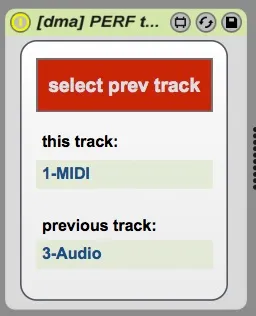
A simple device with a single midi-mappable button. Press it once to select the track where this device is hosted. Press it another time to select the track that was previously selected.
Useful to quickly jump in-and-out from any track to a specific track - with the ability to go back to the last selected track automatically (for example you could use this to quickly jump between master and current-track with just one button).
The MIDI-mappable button does not store any automation - so you won't accidentally record all those track switches.
MIDI device available (post a request in the comments)
- 1.1: fix an issue with audio not going through the device
Comments (3)
Thanks!