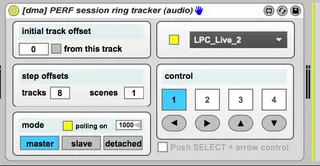
Session Ring Control
Control the session ring ("redbox") of devices incl. Push2...
- Type
- Audio Effect
- Author
- atomictag
- Version
- 1.0
- License
- Attribution
- Live version
- 9.6
- Max version
- 7.2.1
- Downloads
- 1,300
- Updated
- 2016-03-19
Session Ring Control is an Audio Effect for Ableton Live by atomictag, distributed as Creative Commons Attribution. It targets Live 9.6 and Max 7.2.1. On maxforlive.com it has 1,300 downloads. First published 2016-03-18, last updated 2016-03-19. 12 user comments below.
New to Max for Live? Read what Audio Effects do, what the Attribution license means, how to install a device.
Description
Control the session ring ("redbox") of devices incl. Push2, Push, Launchpad, APC 40MKII and (probably) others.
This device can be chained with master / slave mode - so you can keep 2 or more session rings in sync (e.g. Push controlling a Launchpad session ring). You may need to enable "polling mode" if you want the rings to be always synched, i.e. also when the native buttons on the hardware are used to navigate the session view.
Set an initial track offset and choose a step offset for tracks and scenes. Then use the control arrows or the numbered boxes to switch among positions.
On Push / Push 2 it is possible to control the session ring according to the rule-set in this device by enabling the checkbox "Push SELECT + arrow control" and then by pressing SELECT and one of the UP/DOWN/LEFT/RIGHT arrow buttons.
Comments (12)
http://www.maxforlive.com/library/device/2636/isotonik-novation-launchsync
Cheers
D
So yes, similar idea.
For clarity's sake - there is no connection whatsoever with the actual LaunchSync M4L code (that's something easy for everyone to double check, btw). I am sharing this because I have done it for myself - and think others may like it or want to rip it apart and improve it.
There's many ways in maxforlive to achieve the same thing, and i've learnt a few from your patch as well. LaunchSync PRO is coded in JS and supports all of our custom scripts, it wouldn't make much sense to support other people scripts obviously....
Be great if this functionality was natively supported as an option in the MIDI preferences though :-)
Should you like to work a little more on this a device
Configuation of N Songs "upper red box left corners" in form of (Track# / Scene #)
motion of the red box through Relative mapable buttons, "next song" and "previous song"
(that would be great ;-)))
1) I'm running Ableton in 32-bit. Do I need 64?
2) main question. This would have to be placed in every Ableton set with more than 8 tracks? Where would it be placed...in the master track?
Every time I load my set which contains your device, it does not connect to my Push 1. I have to go into the device and tick the box in the upper right to enable the script. (Then it works fine.) I would rather not have to do this every time.
Live 11.0.12
Win 10
It does not work for Arturia Keylab mk3. Is there a way to move the red frame down/up each time we change scene, to always have the selected scene on the first line of the red frame ?
Thanks for your help...