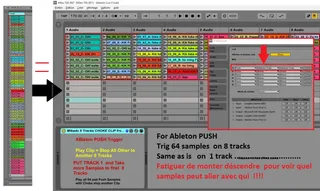
Mikado 8 Tracks CHOKE CLIP from PUSH
see picture PUSH need assign as FIRST line midi ...
- Type
- Audio Effect
- Author
- spiralune
- Version
- 1.0
- License
- None
- Live version
- 9.2
- Max version
- 6.1.7
- Downloads
- 698
- Updated
- 2017-08-12
Mikado 8 Tracks CHOKE CLIP from PUSH is an Audio Effect for Ableton Live by spiralune, distributed as freeware, with no license specified by the author. It targets Live 9.2 and Max 6.1.7. On maxforlive.com it has 698 downloads. First published 2015-09-18, last updated 2017-08-12. 6 user comments below.
New to Max for Live? Read what Audio Effects do, how device licenses work, how to install a device.
Description
see picture
PUSH need assign as FIRST line midi surface controller
and you see 8 x 8 Red rectangle
and PATCH Max put on First track
its work on audio and midi track
------------------------------------
For Auto Watch " Selected Clip "
preference "record, warp, launch"
Enable = selection at launch
= sélection au lancement
---------------------------------
crop and looped clip to all 64 pad Push and more on first 8 tracks session view .
And Play from PUSH and re-record in Arangement view ....
...........................
Is equivalent DrumRack CHOKE ........
create 8 tracks and Put Patch on First Track ...
Next play more clip with push !!!! Play on clip Stop all Other !!!
Support Quantize Live global setting ......
And No overlap CLIP in arrangement View
Cool to remix Long live record and re-arange so ... so ...
--------------------------------
PUSH 2
http://www.maxforlive.com/library/device/4281/mikado-8-tracks-choke-clip-from-push-2
Comments (6)
I'm very interested in your work, but...
This devices doesn't work for me.... on Live 9.7.1 and latest version of Max....
I have Push1...
Is that normal ?
Thank you !
Is it supposed to work with MIDI clips as well or only audio files?
see picture
PUSH need assign as FIRST line midi surface controller
and you see 8 x 8 Red rectangle
and PATCH Max put on First track
its work on audio and midi track
I've tried exactly that and am still unable to get it to work as described. Triggering clips on other tracks does not stop the currently playing clip on any other track.
Here is a quick video: http://recordit.co/7dq1a7EB5j
ok
i don't have PUSH 2
Try this new version
if that work
http://www.maxforlive.com/library/device/4281/mikado-8-tracks-choke-clip-from-push-2
Keep me informed
thank