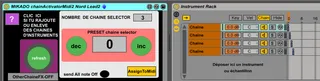
MIKADO Midi InstruRack chain selector 2017
Based on: ChaineActivatorMidi by morganjenks http://ww...
- Type
- MIDI Effect
- Author
- spiralune
- Version
- 1.0
- License
- AttributionNonCommercial
- Live version
- 9.6.2
- Max version
- 6.10
- Downloads
- 852
- Updated
- 2021-07-22
MIKADO Midi InstruRack chain selector 2017 is a MIDI Effect for Ableton Live by spiralune, distributed as Creative Commons Attribution-NonCommercial. It targets Live 9.6.2 and Max 6.10. On maxforlive.com it has 852 downloads. First published 2017-04-01, last updated 2021-07-22. 6 user comments below.
New to Max for Live? Read what MIDI Effects do, what the AttributionNonCommercial license means, how to install a device.
Description
Based on: ChaineActivatorMidi by morganjenks
http://www.maxforlive.com/library/device/3895/chainactivatormidi
audio version here
https://www.maxforlive.com/library/device/4572
------------------------
ATTENTION READ THIS FIRST
""RAck at the rigth of this patch is auto mapped to Chain Selector and no need assigned anything ""
""each chain selector need diagonaly assigned=0-127""
""Clic REFRESH auto Num Number of Chain in the Rack""
--------------------------------------------
this patch is use to make rack instruments or FX
to work as pseudo Program change .. with 128 preset
who eatch chaine selector is one preset ..
2 assignable up down Button preset chain selector
( preset up down .. loop end auto return to first)
1 assignable chain selector NumBox to rotary CC
chain can recall with a same number at the rigth off the CLIP Name ((bass funky 18 = recall chain 18)
up down directely recall adjacent preset just recalled
((17-19))
Save CPU Button =Other Chain FX OFF
auto desactivate all other plug or instruments in another Chain.
----------------------------------------------------------------------------
so eatch Rigth Number in the Named on eatch Clip on eatch Track on the scène recall All there specifics Preset Like a Groove box ..
Live Scène= Pattern
Number in the Clip name = Preset of that Track
each clip has its preset .. cool
and fun for Live with 8 Track ...
Because eatch track can have 0-127= 128 vst instruments at presets if you want
CPU friendly with Button= OtherFx OFF =AUTO desactivate All Plug to another Chain
--------------------------------------
iam use it to recall instrument/vST chain preset
add assignable midi -- inc / dec -- with loop the last chain to the first chain
number of chain auto detect when clic refresh ( chain number = 0 to 127 )
Number at the end of clip name recall this chain
exp1: midi clip name : Bass fret cool 14
Button inc / dec direct recall good next / preview chain = so 13 or 15
exp2: 33 Bass Lead 23 = call chain 23
(( Number must be at Right !!! Because ??
Ableton auto Name new Clip Recorded and
set number at LEFT
and need avoid new rec midi clip to interact with the chain )) cool
-------------------------------
button " OtherChainFX-OFF "
desactivate all plug to all other chain
you can select " OtherChainFX-ON"
if you pc have good proc and ram
and you need extrem reactivity at extra low latency
without draoput and click when need to change quickly preset , Even while continu to playing
-------------------------------------
Add ,, Send ALL Note OFF and Pedal Sustain OFF
at change ((prevent note blocked))
---------------------------------------------------------------------
To avoid reconfiguring your midi controller button
Button assign to midi note or midi CC ((no noteoff))
if assigned ""inc /dec "" from controller::
-- need double clic to work correctly
-- or clic once , jump two chain
try another .. button position
it's save with ableton project
Comments (6)
Thanks for help
Thank to your interest
check this news version
http://maxforlive.com/library/device/4572/mikado-audio-fx-rack-chain-selector-2018
------
remenber Chain selector value can olso recall
by CLYPHX SNAP ACTION
instead of Rigth Clip Name Number
http://beatwise.proboards.com/thread/992/current-version-clyphx-live-9
but in Live 10 the number of the new clip name its on the RIGHT SIDE (ex: Piano 24), so when I press record on Session View it auto-changes the preset.
Currently works only to play, and record on Arrangement View.
Can you please fix that? I tried myself but I failed miserably :(
i am no time to update for live 10 and 11
coming soon sorry