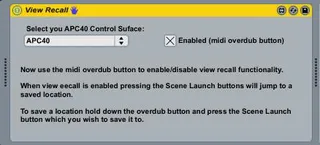
APC40 View Recall
This is a utility patch for APC40 owners, it allows you to q...
- Type
- MIDI Effect
- Author
- tomoram
- Version
- 1.0
- License
- None
- Live version
- 8.1.3
- Downloads
- 1,003
- Updated
- No Updates
APC40 View Recall is a MIDI Effect for Ableton Live by tomoram, distributed as freeware, with no license specified by the author. It targets Live 8.1.3. On maxforlive.com it has 1,003 downloads. Published 2010-06-27. 4 user comments below.
New to Max for Live? Read what MIDI Effects do, how device licenses work, how to install a device.
Description
This is a utility patch for APC40 owners, it allows you to quickly jump to specific places in your live set with your APC40.
To use it load up the patch on a midi track then select your APC40 from the dropdown list. Once you have done this you can enable and disable the View Recall functionaliy but pressing the Midi Overdub button.
When the patch is enabled (when the Midi Overdub button is lit) then you can jump to specific places in your live set but pressing the 5 Scene Launch buttons. To save the position that a specific button jumps to navigate there and hold down the Midi Overdub button and press the Scene Launch button you want to assign this location to. If you now navigate away from this point then press the Scene Launch button again you will jump straight back there.
While View Recall mode is enabled the Scene Launch buttons do not launch a scene, to return back to default functionality press the Midi Overdub button to switch it off.
This is only my second M4L patch so I'm very keen to hear of any suggestions on how to improve it and any bugs you have find.
I hope you find it useful!
Comments (4)
print box of max says set_offsets id 0 whether you press scene button 1 to 5
the scenes does not start and exiting from your patch scenes button are no longer usable.
Any new patch? thanks
Is there a way to save the locations with a song so when we load a Live set it ready to go rather than having to re-map every time?
Maybe I'm missing something tho?
:-) P