Arpeggio Designer
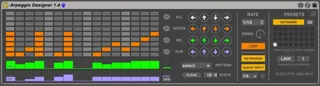
Arpeggio Designer is an advanced real-time MIDI processor th...
- Type
- MIDI Effect
- Author
- svankov
- Version
- 1.4
- License
- Commercial
- Live version
- 9.7.7
- Max version
- 6.1.10
- Downloads
- 3
- Updated
- 2021-02-28
Arpeggio Designer is a MIDI Effect for Ableton Live by svankov, distributed as a commercial (paid) device. It targets Live 9.7.7 and Max 6.1.10. On maxforlive.com it has 3 downloads. First published 2016-03-25, last updated 2021-02-28. 7 user comments below.
New to Max for Live? Read what MIDI Effects do, what the Commercial license means, how to install a device.
Description
Arpeggio Designer is an advanced real-time MIDI processor that combines an arpeggiator and a sequencer to give you total control over crafting detailed mono or polyphonic phrases from your chord input:
- Each note in the held chord gets its own sequencer lane, with velocity and duration per step.
- 32 available preset slots, and a collection of included patterns to get you started quickly.
- Built-in input quantizer
Video Demo:
http://www.tetmusic.com/arpeggio_designer_features.html
Compatible with Live 9/10/11.
Arpeggio Designer can be linked to our Apollo Chord Designer device as a great way to kickstart musical ideas by associating a different mono or polyphonic phrase with each chord.
V1.4 Update:
- Preset selection can now be automated.
- New Play mode; sequence can now run as Loop or One Shot
- New Legato duration button, which will sustain a step until the next step instead of using static step durations
- New Retrigger / Continue option: sequence can now retrigger from beginning on new chords, or continue when playing a different chord quickly (tolerance window is adjustable)
- Improved Input Quantization function
Comments (7)
My wish list would be: (some would mean a different layout that either does not fit the standard detail view height or a wider layout):
- On off button per step
- Octave switch (one up, one down) per step
- More pitch steps = a higher/scrollable grid similar to drum rack (I love playing with big wide, chords progressions, deadmau5/bodzin style)
- Probability per step
- 64 steps option
- Finer adjustments of the velocity / step length
- an additional mappable parameter row
Glad to hear you're enjoying the device! Thanks for the suggestions, I'll look into these for the next update.
The new Link feature allows you to link sequence presets in Arpeggio Designer to triggered chord slots our Apollo Chord Designer device, enabling you to create expressive monophonic and polyphonic phrases. Link can also be used with multiple Arpeggio Designer devices on different channels, allowing you to trigger multiple instrument phrases from a single instance of Apollo Chord Designer.
Short demo here:
https://youtu.be/YCwRv0b9vR8