Uzi Note Repeater
Uzi is a Max For Live note repeater that allows you to quick...
- Type
- MIDI Effect
- Author
- svankov
- Version
- 1.0
- License
- Commercial
- Live version
- 9.1.6
- Max version
- 6.1.9
- Downloads
- 3
- Updated
- 2018-03-30
Uzi Note Repeater is a MIDI Effect for Ableton Live by svankov, distributed as a commercial (paid) device. It targets Live 9.1.6 and Max 6.1.9. On maxforlive.com it has 3 downloads. First published 2014-12-04, last updated 2018-03-30. 5 user comments below.
New to Max for Live? Read what MIDI Effects do, what the Commercial license means, how to install a device.
Description
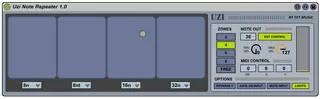
Uzi is a Max For Live note repeater that allows you to quickly perform and program complex rhythmic parts.
The device features an XY grid that can be divided into multiple zones, and each zone can be assigned a tempo-synced repeat interval. You can control Uzi's xy with a mouse, or map it to a MIDI controller. Moving horizontally triggers notes at the corresponding interval, while moving vertically controls velocity for nuanced performance. You can use Free Rate mode for off-the-grid sample triggering, great for bouncy, glitchy rhythm programming. Note to repeat can be set either manually in the device, or via an external MIDI controller.
A simple but powerful tool for anybody working in Ableton Live, Uzi makes rhythm programming quick and effortless.
See Uzi in action here - http://www.tetmusic.com/uzi_videos.html
Comments (5)
A question: can't I record the performance?
If not, I'd say that would be the first thing to address in an update.
Thanks
If you have mapped an external controller to the xy, it will record the xy movement as automation data. Using the mouse won't record any automation at the moment, but I can change it to do so in a future update.
Another way of recording the performance is to place Uzi on its own channel, then route that channel's MIDI output into your drum channel. If you record-enable your drum channel and start recording, Uzi's MIDI output will be printed onto your drum channel (even when using the mouse). You can then tweak and edit the part as needed.
Thanks for the feedback and let me know if there are any other features you think of that could be useful to your workflow.