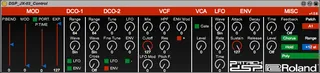
DSP Roland JX-03 Control
Roland JX-03 Max For Live Control You can now control...
- Type
- MIDI Effect
- Author
- PatrickDSP
- Version
- 1.0.6
- License
- Commercial
- Live version
- 9.7
- Max version
- 7.2.4
- Downloads
- 3
- Updated
- 2019-01-16
DSP Roland JX-03 Control is a MIDI Effect for Ableton Live by PatrickDSP, distributed as a commercial (paid) device. It targets Live 9.7 and Max 7.2.4. On maxforlive.com it has 3 downloads. First published 2016-08-11, last updated 2019-01-16. 3 user comments below.
New to Max for Live? Read what MIDI Effects do, what the Commercial license means, how to install a device.
Description
Roland JX-03 Max For Live Control
You can now control your Roland Boutique JX-03 Synth in Ableton Live! Update your synth to firmware system 1.10 and use this Max for Live patch to control and automate it. No more fiddling with tiny knobs or sliders.
DSP_JX-03_Control.amxd
Note: Remember to set your synth to MIDI Mode 3 or 4 to send and receive MIDI Messages. You can find out how from this PDF by Roland: https://static.roland.com/assets/media/pdf/JP-08_JU-06_JX-03_l_ver110_e01_W.pdf
https://gumroad.com/l/jx-03
**1.0.2 update**
Some extra debugging and testing. Download the updated version from the Gumroad.com site.
**1.0.4**
Added Assign mode for Poly, Solo & Unison modes
**1.0.5 update**
More uniform layouts of banks for Push & Push 2
**1.0.6 update**
On rare occasion the Expression Pedal fader would start at 0, making the synth silent. this has now been fixed.
Comments (3)
But again,
Yesss, the JX-03 is so incredeable amazing in dual mode!
Two different patch settings played together in some kind of hardwired roland sync feature.
This makes my alpha juno sounds so cheap.
So, Please add the Dual voice switch, and the upper/lower voice selection.
and fix the chorus to 0-1-2-3, cause the chorus button is'nt working.
I can personally send sysex patches with my SynthCtrl plugin,
But If You can program a patchlist windows browsing sysex files as patches
the JX-03 will be the best Boutique and sold out very soon on 2de hand.
The JX transmit the Sysex when You store the preset in one of the 16 programs.
http://stephenm.be/mfl-jx.png
I could easily add the dual layer & Upper Lower switch, and fix the chorus.
Okey, I'm into Max for Live, thanks to this devices,
Regards,