- Type
- Audio Effect
- Author
- dric
- Version
- 1.1
- License
- Attribution
- Live version
- 9.6.2
- Max version
- 7.2.4
- Downloads
- 1,932
- Updated
- 2016-10-25
StuttBuff is an Audio Effect for Ableton Live by dric, distributed as Creative Commons Attribution. It targets Live 9.6.2 and Max 7.2.4. On maxforlive.com it has 1,932 downloads. First published 2016-10-12, last updated 2016-10-25. 10 user comments below.
New to Max for Live? Read what Audio Effects do, what the Attribution license means, how to install a device.
Description
Hello,
this is the month of stuttering :)
my new stutter effect. This is the little brother of Stutter2 (http://www.maxforlive.com/library/device/3800/stutter2)
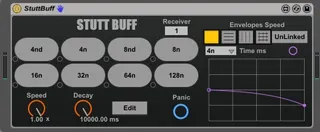
It's work with buffer rather than tapin~ tapout~, and the other difference is that you can control speed with a function envelope. you can slow down, reverse, ect.
(if the button "Linked" is on, the all pads share the same envelope).
The envelopes is modulation of speed knob. The speed knob
go to -1 1, the range for modulation(env) go from -2 2 so you can sweep the total range of knob even if knob is in position 1 or -1.
You can use envelope or automatize knob in live.
This device is ready for mira.
Like stutt2 i've make "stutt sender" this alow that you can control the stutts buttons with notes.
for use stuttbuff sender:
Put it on midi track, choose one of 8 targets, you can control up to 8 BuffStutt devices.
And set up the corresponding receiver on BuffStutt.
(Notes are C3 to G3)
you can control up to 8 stuttbuffs at the same time.
Buffstutt Sender here:
http://www.maxforlive.com/library/device/3842/stuttbuffsender
1.1 bug fixe if more than one buffstutt is loaded in set live
Comments (10)
Do you want the application “Ableton Live 9 Suite.app” to accept incoming network connections?
Frankly I'm not sure if it works correctly, I'd for sure check again at home and re-upload just to be sure, it certainly shouldn't make me accept firewall settings. Anyway Peace!
no message.
ok i re-upload anyway.
if someone can tell me if you have the same issue that anivia it would be cool.
thx by advance
ps: thanks anivia for your help.