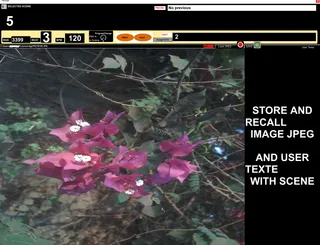
MIKADO Scenes Kontrol and Monitor
Scènes Kontrol Monitor Monitor scene name: cure...
- Type
- MIDI Effect
- Author
- spiralune
- Version
- 1.0
- License
- Commercial
- Live version
- 9.6.2
- Max version
- 6.10
- Downloads
- 304
- Updated
- 2017-08-14
MIKADO Scenes Kontrol and Monitor is a MIDI Effect for Ableton Live by spiralune, distributed as a commercial (paid) device. It targets Live 9.6.2 and Max 6.10. On maxforlive.com it has 304 downloads. First published 2017-04-01, last updated 2017-08-14. 2 user comments below.
New to Max for Live? Read what MIDI Effects do, what the Commercial license means, how to install a device.
Description
Scènes Kontrol Monitor
Monitor scene name: curent, next, preview,
PERSISTANT SAVE ET RELOAD IMAGE JPEG AND TEXTE
WITH SCENE
YOU CAN REORGANISE SCENE ORDER WITOUT LOSE JPEG AND TEXT
Put on midi track
just select a scene , clic load ,choose image in PC
type a text on right and clic save ..
you can change image or text any time just clic save
-------------------------------------------
receive MIDI IN PROGRAM CHANGE from midi keybord
to recall SCENE
((block ProgChange = do not send to instruments rack and vst in a chaine ))
and ASSIGNABLE PREVIEW NEXT SCENE
PROG CHANG 0 IS ALWAY TRIG FIRST SCENE
progchange 3 always trig scene 4 independently to her name
now , you can drag and reorganise scene
to assigne scene at a specifique external midi Program Change
so only firts 128 scènes is usable with Program change
prog= 0 to 127
---------------------------------------------------
Button assign to midi note or midi CC ((no noteoff))
if your controller need::
double clic to work corectly
or clic once jump two scene
when clic ""inc /dec "" from contrroller
try another .. button position is save with ableton
---------------------------------------------------
Revisited patch from zangpa
http://www.maxforlive.com/library/device/449/trigger-scene
Comments (2)
I would like to hire you to build another device, if possible. Please comment here if you are interested, and we can discuss further by email.
t
je ne suis pas un grand spécialiste de max
meme si j'arrive toujours a m'en sortir ..
tu peut me joindre voir si je peut vraiment t'aider [email protected]
-------------------------------------------------
tu peut allez voir ici j'ai revu ce patch pour un ami
http://www.maxforlive.com/library/device/4248/mikado-scenes-kontrol-and-monitor-v2
a utiliser en conjonction avec celui ci
http://www.maxforlive.com/library/device/4082/mikado-chain-selector-2017
good vibbeeeee