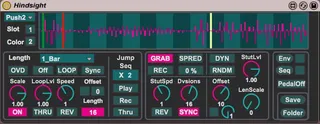
Hindsight
Hindsight is a looping engine built in Max 7 for Ableton Liv...
- Type
- Audio Effect
- Author
- dataf1ow
- Version
- 1.0
- License
- AttributionNonCommercialShareAlike
- Live version
- 9.7.1
- Max version
- 7.3.3
- Downloads
- 4
- Updated
- No Updates
Hindsight is an Audio Effect for Ableton Live by dataf1ow, distributed as Creative Commons Attribution-NonCommercial-ShareAlike. It targets Live 9.7.1 and Max 7.3.3. On maxforlive.com it has 4 downloads. Published 2017-04-05. 26 user comments below.
New to Max for Live? Read what Audio Effects do, what the AttributionNonCommercialShareAlike license means, how to install a device.
Description
Hindsight is a looping engine built in Max 7 for Ableton Live. It has a wealth of features fore realtime performance, and improvisation, but is just as comfortable in a studio setting rearranging incoming audio, and allowing you to sequence, chop, record, and mangle in real time from Push 1 and Push 2.
Included in the download is the hindsight device, full documentation, some files for further integration with a KMI Softstep and a companion device that will open up some of the input features for real time beat chopping to any MIDI controller.
Check out a basic overview: https://youtu.be/8ktXnfCnTAI
Check out hardware integration: https://youtu.be/2I8pxAE8ihE
Comments (26)
I have one question though, is there a way to mute the incoming audio so that nothing but the looped audio plays? I am pretty clueless when it comes to gen, so I had no idea how to make it work.
Also, I made a personal edit that increases the loop length to 8 bars, but was unable to get it to work for 16 bars. If there was a way to provide a wider range of loop lengths that would definitely serve my purposes better.
The last thing I noticed are some audible clicks and pops when the loop button is engaged or disengaged while something is playing. Probably a simple fix, but I couldn't quite figure out where to implement it myself.
Anyway, nice device, has lots of interesting potential uses for me.
You'll need to increase change the size of the buffer used for recording the loop.
There are some clicks, and it's not exactly an easy fix if you're not savvy with genexpr and you'd have to parse through my poorly commented code to find out where I'm doing the fading. I'll have to look into this, it would be helpful if you could define what 'while something is playing' means. Does that mean while a loop is playing in hindsight? Or does it mean while audio is coming into hindsight?
I am not handling the output summing logic in the most elegant way, so I will be re examining that soon. It's not as simple as adding a small envelope unfortunately, but it will get fixed! Thanks for bringing it to my attention, and making it a priority moving forward.
Just 2 ideas; you have a thru play mode and a gate mode but you don't have a thru play gate mode that plays thru while heald.
Theres a monome device called mlr you may have heard of. The only real difference between hindsight and mlr is on the monome you can hold one slice point down and then touch another and it creates a loop between them.
You knocked the slice recording out of the park though I've been wacking away at that for a couple days now. So good.
The reason colors above four don't work is that, there are no colors above four. I should limit that number box or add more colors.
playhead feedback on push 1 is working fine for me - any errors in the ma window? (right click on device title bar, show max window). Is this the same for all color palletes? Live, max and os version?
I actually used MLR years ago, and I always wanted to make a version that was based on live input, and worked instead of Live seamlessly. I could add those features in. My initial thoughts would be just add the 'gate play thru' behavior into gate mode, and have the loop point definitions be part of thru mode. The loop point definitions are exactly like the loop modification section, so that feature is available, just not from the pads.
I love the slice recording. Using that with the grab sequencer is rhythmic mayhem. Also overdubbing live instruments into a playing slice sequence is really interseting.
The errors are likely an initialization order thing, do they persist after selecting a slot?
I'll shoot you an email with the playhead fix in later today.
Another bug is the color doesn't recall on loading a set.
Aside from the bugs it's still my favorite new toy.
I am getting the color setting to properly recall on the device on set load, is it just not recalling on the hardware?
Play head fix worked great.
Since I'm using the recording function on push (I don't know what termonology you use for some of the features, the bottom scene button is what I mean) I don't have need for the sequencer view. I wonder how difficult it would be to have the option of making the sequencer a parameter sequencer that can map to live parameters? That would be really cool. You could map it to an effects chain selector and get down to some craziness. Feel free to ignore my ideas that don't strike your fancy I know they are tall orders.
I'm not sure if you know this, but your comment mad it seem like you thought that the grab sequencer is useless if you're using the jump sequencer.
If you are using the bottom scene button to record slices, you can play that sequence back, and also play back the grab sequencer at the same time. There are two playheads in the device, so you might find a use for it yet.
I do plan on adding built in effects with their own sequencers. I can see how adding a mappable sequencer could be interesting though. I will keep that in mind for future versions.
I've had some issues with loading,reloading sets on occasion. I'll have a look at this in the coming days, and see if I can figure out what's going on.
Even cooler would be the ability to choose to pass live audio during stops.
Still crazy about your device. Any word on current bugs?
thanks!
thanks!
Thanks for helping !
It was developed on Live 9.7, max 7.3, and Mac osx 10.10, so that all checks out. Have had no issues reported, as I said, so this might be something you're overlooking, or something system specific.