Mikado 8 Tracks CHOKE CLIP from PUSH
"" Someone can confirm me if it works with push2"" -...
- Type
- MIDI Effect
- Author
- spiralune
- Version
- 21.0
- License
- None
- Live version
- 9.7
- Max version
- 7.3
- Downloads
- 395
- Updated
- 2017-08-20
Mikado 8 Tracks CHOKE CLIP from PUSH is a MIDI Effect for Ableton Live by spiralune, distributed as freeware, with no license specified by the author. It targets Live 9.7 and Max 7.3. On maxforlive.com it has 395 downloads. First published 2017-08-12, last updated 2017-08-20. 4 user comments below.
New to Max for Live? Read what MIDI Effects do, how device licenses work, how to install a device.
Description
"" Someone can confirm me if it works with push2""
------------------------------------------------------------------------
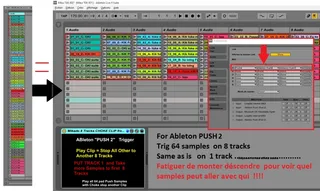
PUSH 2
see picture
first: ableton midi preference
PUSH need assign as FIRST line midi surface controller
and you see 8 x 8 Red rectangle
and :
Drag & drop PATCH Max on First track
work on 8 first audio "and or midi" track
but you can up and down infinitly
--------------------------------------------------
For Auto Watch " Selected Clip "
preference "record, warp, launch"
Enable = selection at launch
= sélection au lancement
---------------------------------
crop and looped clip to all 64 pad Push and more on first 8 tracks session view .
And Play from PUSH and re-record in Arangement view ....
...........................
Is equivalent DrumRack CHOKE ........
create 8 tracks and Put Patch on First Track ...
Next play more clip with push !!!! Play on clip Stop all Other !!!
Support Quantize Live global setting ......
And No overlap CLIP in arrangement View
Cool to remix Long live record and re-arange so ... so ...
-------------------------------------------------
PUSH 1
http://www.maxforlive.com/library/device/3225/mikado-8-tracks-choke-clip-from-push
Comments (4)
Only issue:
- When using with MIDI tracks, if you want all the MIDI clips to be sent to Track 1, then you have to set Track 1 to In, which will bypass the 8 clips on Track 1.