Midi Filter Select
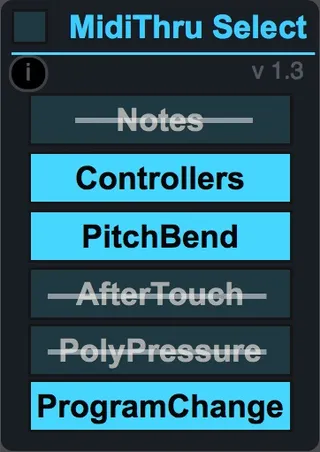
This device let you pass/filter selected types of midi messa...
- Type
- MIDI Effect
- Author
- Takadimi
- Version
- 1.4
- License
- Attribution
- Live version
- 9.6.2
- Max version
- 7.2.4
- Downloads
- 3,036
- Updated
- 2018-10-26
Midi Filter Select is a MIDI Effect for Ableton Live by Takadimi, distributed as Creative Commons Attribution. It targets Live 9.6.2 and Max 7.2.4. On maxforlive.com it has 3,036 downloads. First published 2017-10-03, last updated 2018-10-26. 5 user comments below.
New to Max for Live? Read what MIDI Effects do, what the Attribution license means, how to install a device.
Description
This device let you pass/filter selected types of midi message, such as :
note,
controller continous,
pitch bend,
aftertouch,
poly pressure,
program change.
This is a selective midi thru. Very useful to manage the midi flow and select type of midi events.
versions
- 1.4 bugfix with MSB/LSB
_____________________________________
- cautions : program change filter/pass also Bank=MSB(Cc00) and SubBank=LSB(CC32)
- any questions ? -> [email protected]
Comments (5)
Thanks für creating and offering this device. Does your device offer the option of filtering MIDI messages with a specific channel only? What I’m looking for is the ability to “listen” to “All” MIDI channels on a track, but filter out all note messages coming from a specific attached keyboard controller. This would give me the ability to use my e-Piano to trigger the notes on the instrument on the respective track, while being able to make use of the wheels and knobs of another attached controller, without having the latter trigger the notes of the instrument on the track.
I hope you get what I mean. Thanks for considering!
Best LeoVirtuoso
As far as I know, in a midi or instrument track, all midi data are writed by ableton Live (inside the track), as coming from channel 1. This is a specificity of Ableton Live.
This mean you can select midi in channel in the input menu and mid channel out the output menu but inside the track, midi channel has no importance.
So, if you need to select midi data according to their channel you have to select it by creating a midi track for each channel then routing it by selecting approprate midi channel output.