- Type
- MIDI Effect
- Author
- Takadimi
- Version
- 1.2
- License
- None
- Live version
- 10.0.1
- Max version
- 7.3.5
- Downloads
- 2,481
- Updated
- 2018-11-29
Cc converter is a MIDI Effect for Ableton Live by Takadimi, distributed as freeware, with no license specified by the author. It targets Live 10.0.1 and Max 7.3.5. On maxforlive.com it has 2,481 downloads. First published 2018-11-01, last updated 2018-11-29. 10 user comments below.
New to Max for Live? Read what MIDI Effects do, how device licenses work, how to install a device.
Description
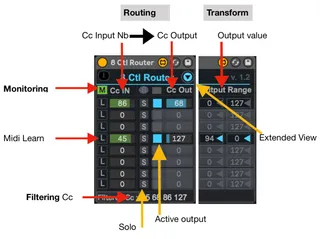
This device convert midi Cc (control change) to any other midi Cc. It can be used as a midi Cc ROUTER or midi Cc VALUE CHANGER. It also MONITOR selected Cc input and output and FILTER/let Pass Thru unselected Cc.
Main features
==========
8 slots with the ability to :
- route change any Cc in number to any Cc out Nb
- convert : change output range value
- monitor : selected Cc number (input and output)
- solo/mute : output CC
- filter selected Cc and Thru/block other other Cc Nb
- midi learn button
Caution :
========
This device filter selected Cc to avoid any conflict.
you can also decide to block all Cc Input
usual option
=========
- normal/extended view
- « info" button and "edit device name" button
- designed for push
- info : [email protected]
Comments (10)
As for a track : when active is enable, it open output routing. If disable, nothing happen...
When I add the CcConverter.amxd device to the midi chain (1st device) the table with 8 controller slots remains blank (black background only).
If I open the device in Max, I see:
8 errors:
bpatcher: bpatcher: error loading patcher BB.CCConvert.maxpat
These point to: "varname" : "BPCC_1",
then 2 errors:
live.text: can't find ArrowOn.svg
pointing to: "varname" : "InputMin[8]",
then 8 more errors:
pattrforward: could not resolve requested object (BPCC_1::Monitor)
these point to: pattrforward
is there a component missing in the device?
Am I using the device wrong? I expected to see 8 slots to populate with
incoming controllers to translate...
Thanks! any insight you could provide is appreciated.
Happy to send screen grabs off-list.
13v
Thanks for your post
Enjoy playing !
Does anyone knows a solution to convert CC to pitch bend data? that would be great