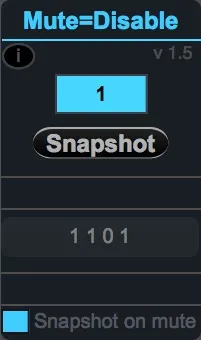
Mute Mean Disable
Relief your cpu charge by automatically disabling temporarly...
- Type
- MIDI Effect
- Author
- Takadimi
- Version
- 1.5
- License
- Attribution
- Live version
- 9.6.2
- Max version
- 7.2.4
- Downloads
- 451
- Updated
- 2018-10-26
Mute Mean Disable is a MIDI Effect for Ableton Live by Takadimi, distributed as Creative Commons Attribution. It targets Live 9.6.2 and Max 7.2.4. On maxforlive.com it has 451 downloads. First published 2017-12-10, last updated 2018-10-26. 8 user comments below.
New to Max for Live? Read what MIDI Effects do, what the Attribution license means, how to install a device.
Description
Relief your cpu charge by automatically disabling temporarly unused devices. This patch disable devices when the track is muted and restore initial enable state when track is reactived. Very useful for big set with many devices and plug-ins.
Audio track version of this device avaliable here : http://maxforlive.com/library/device/4498/mute-mean-disable-a
deeper explanations
============
Some plug-in take CPU resource even if they are not used. This is a real problem when you work with a big live set with a lot of tracks and different plug.
This device take a snapshot of the following devices in his track; it disable them if track is mute, re-enable when track is unmuted.
How ? it simply store of enable state for all devices placed on his right.
main features
==========
- - snapshot : record of enable state of device places on the right
- - listen to track mute state
- - button for mute/unmuted track
- - disabling every following device when track is muted
- - restore the enable state of the following devices when track is reactived
restriction- limitation
=============
- - ableton rack : this patch consider rack as a unique device . It do not look inside the rack. (anyway you can put this device into a rack track and it works ! )
- - this patch do not look at the devices placed on his left. In that way you can choose to let some "source" devices to keep their state in any case.
specific options
==========
- - snapshots on mute : automatically take (or not) a snapshot each time you mute the track
- - ability to rename the device on top
for any comment, suggestion, or question : let a message here or mail
Comments (8)
As far as I know, "Device enable" parameter's changes are writen in undo history by live. So every changes with this device are stored in Live's undo history
WHEN I MOVE AWAY FROM THE TRAK AND COME BACK TO IT, ALL THE FEVICES ARE STILL DISABLED, BUT KOMPLETE KONTROL IS ENABLED AGAIN ! ! ! ! !
PLEASE UPDATE URGENTLY ! 1 !
I WAS USING IT FOR MY ORCHESTRAL TEMPLATE - NOW IT DOES NOT WORK PROPERLY WITH KONTAKT. WHEN I MOVE AWAY FROM A TRACK< AND COME BACK TO IT, KONTAKT IS RE-ENABLED AGAIN
PLEASE, I'M BEGGIN YOU TO UPDATE HITS DEVICE
MAC VENTURA
ABLETON 12.1
KONTAKT 7.10 or 8.1