Selected Track
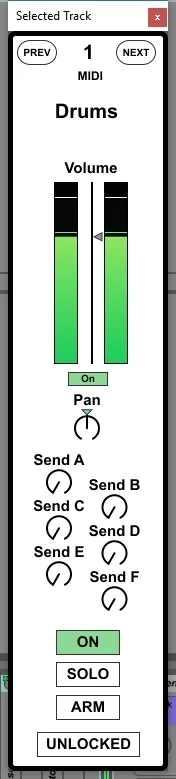
Displays the channel strip of the currently selected track i...
- Type
- MIDI Effect
- Author
- mothergarage
- Version
- 1.3.1
- License
- Commercial
- Live version
- 9.7.5
- Max version
- 7.2.4
- Downloads
- 1
- Updated
- 2018-02-04
Selected Track is a MIDI Effect for Ableton Live by mothergarage, distributed as a commercial (paid) device. It targets Live 9.7.5 and Max 7.2.4. On maxforlive.com it has 1 downloads. First published 2018-02-02, last updated 2018-02-04. 4 user comments below.
New to Max for Live? Read what MIDI Effects do, what the Commercial license means, how to install a device.
Description
Displays the channel strip of the currently selected track in a floating window.
Map its parameters to a controller.
V1.1: Added buttons for Arm, Previous and Next Track. Added Indicator if the selected track is an audio or MIDI track. GUI updates.
V1.2: Added Solo button. You now can lock the device to a track, so it stops following the selected track. GUI updates.
V1.3: Added button to deactivate the meter display. The floating window now opens in the center of the screen. Bugfixes.
V1.3.1: Added Live 10 compatibility.
Comments (4)
But i have trouble using it, because it's adding Ableton UNDO-Steps constantly, even if you don't touch any of the "selected track"-parameters.