a better search for max devices
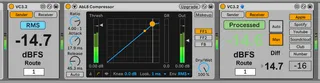
Volume Compensator screenshot

Volume Compensator

by LAEX

This patch compensates volume after passing some plugins....

View on maxforlive.com Website

Type
Audio Effect
Author
LAEX
Version
3.5
License
None
Live version
11.2.6
Max version
8.3.2
Downloads
1
Updated
2022-11-27

Description

This patch compensates volume after passing some plugins.

Consist of two devices Compensator send (CS) and Compensator recive (CR). CS measures RMS and CR adjusts output level to same RMS. Put some plugins between them, make tweaks and listen changes only, no loudness increase or decrease.

3.5 Fixed bug with volume strike when effects chain is heavily clipping. Small fixes.

3.3 Updated GUI for reflecting Live's colours

3.2 Added Auto and Manual setting on Receiver

Difference number between R in and S out

Matching numbers on R became green

3.1 Single file patch

3.0.1 fixed No sound when transport is inactive, fixed routing

3.0 Added LUFS metering, Routing incteased to 30 channels. Small bug fixes.

2.0 New clear GUI, now possible to bypass all processing whatever it contains (native, M4L, VST, AU), Matched RMS now becomes green on Receiver, small bugfixes.

1.1 Added 5 groups to use in one project

Added video how to use plugin as reference tool

https://youtu.be/3QIeBzhvg2k

Simple video

https://youtu.be/RNA9aqhr-_s

maxforlive doesn't allow to upload zips. so grab device on gumroad link

If You have any questions, contact me via mail.

Comments (48)

  • Crampe · February 18 2018
    Such a great idea!!!!
  • LAEX · February 18 2018
    @Crampe Thank You!
  • LAEX · February 18 2018
    Hey Folks! Please confirm if it works on Windows 10. I have some complains, but no chance to test.
  • Shilpa111 · February 19 2018
    Hi there...really nice information it is very helpful to me thank u
  • c2001 · February 19 2018
    Hi, nice but I think it's the same as http://www.maxforlive.com/library/device/3150/audio-amplitude-preserver-sender except you can use as many as you wish in a given project
  • braduro · February 19 2018
    LOVE LOVE LOVE
    Now if a utility were at the end of that chain, I could use the difference between the the CS and the CR to adjust the gain and then take out the instances of the volume compensators, right?
    So wouldn't it be possible to construct the CR such that it's intended purpose is to be inserted before a utility and to then takeover the gain dial of the utility from it's current position?
    It might be nice to carry these tools into a studio session, or a live situation if they prove to be solid, and then not feel inclined to leave them in place. I say any chance to take a m4l device out of the equation in a performance critical situation is probably the right move....
  • braduro · February 19 2018
    Such an odd behavior I'm getting from the receiver. When I turn it on, it sounds EXACTLY as the pedal effect that I had on to the right of it, EVEN when the pedal device is turned OFF. In other words, it sounds like a volume jump (and not that it is maintaining the same RMS) when the CR is turned on, although the values on readout is that it is dynamically attenuating the signal AND even when the device between the CS and CR is turned off, it still sounds like the effect of the device to the right of the CR is turned on (when it isn't) when the CR is turned on...
  • LAEX · February 21 2018
    @c2001 You right! that the same, but Im just cannot found it when decide to make my patch. and for sure if You need staging of many tracks simultaneously use it.
  • ssrmpc · February 21 2018
    Hi
    thx for the plugin. great idea!
    I have found a minor issue if your M4L-devices are used on multiple tracks. The current behavior is that all tracks send to "rms" but The send/receive must be track specific! You have to evaluate the track number (and use it as a prefix in order to send on "rms-channels".
    Then I have an amendment. It might be a good idea to have a "adjust" button. Once pressed the RMS is calculated, transferred and the adjustments are made. After switching it off the sender/receiver do not have to work anymore.
    Well then... keep on going!
  • itsBREX · November 08 2018
    Gumroad purchase page says "This product is not currently for sale." when you try to buy it.
  • LAEX · November 08 2018
    @broah Link replaced. Try download again.
  • srcrustaceo · April 24 2019
    Love it! Thanks a lot!! :D
  • LAEX · June 27 2019
    Loudness compensator for Master channel on the way!
  • thingue · February 18 2020
    Hey, the compressed file cannot open, it's corrupted.
    Only for me...? I'm on MacOs 10.14.16
  • thojavsal · February 19 2020
    Hi, Yes same here, I am on windows 10
  • NameBrandBeatz · February 19 2020
    yeah I can't open the file
  • LAEX · February 20 2020
    Just checked by downloading from Gumroad. all fine. try to use another unrarer. I use Winrar
  • LAEX · February 20 2020
    Reuploaded ZIP file. Please redownload all who have problems.
  • JemGab · February 23 2020
    Hi, great idea for a utility. I tried it but as soon as the "receiver" is activated, it goes silent.The audio is still visible before on the Ableton FX meter but the receiver cuts everything. If I bypass the receiver (yellow button), the sound comes back but obviously the gain stage didn't happen. Is there a particular thing to do with the routing? Mine goes Sender > FX > Receiver with Route on 1.
  • camieldaamen · February 23 2020
    Awesome device!!
  • fabzr · February 25 2020
    What about other DAW's ? Something planned? I would buy it
  • qpsound · February 27 2020
    Hello, Seems like a great tool. I just paid, downloaded the device, put it in Ableton, put it in a channel and can not get it to work. It seems something is buggy with the Receiver portion. Any ideas on how to make it work?
    Thanks
  • igorsegrob · February 27 2020
    gpsound, i'm having the same problem here, when the compressor starts to work,it makes crackling noises as well.
  • Oktagon · March 14 2020
    Thanks for the cool device!
    I'm seeing a significant delay when I enable bypass mode on the receiver. No issues in processed mode.
  • Oktagon · March 14 2020
    Looks like it might be coming from your use of plugsend~/plugreceive~ ?
    https://cycling74.com/forums/plugsendplugreceive
  • Oktagon · March 14 2020
    I found a workaround - group the entire fx chain including the receiver into an fx rack. Then you can enable/disable the entire rack to compare to dry with no latency issues.
  • lapartdufeu · April 09 2020
    Gumroad purchase page says "This product is not currently for sale." when you try to buy it. is there another link? Just saw a video on Ableton and this is a tool I would very much need thank you.
  • itsBREX · April 09 2020
    Not sure about this link, but check out Volume Buddy 2 from Noir Labs. They're both great.
  • lemesbr · April 09 2020
    Not Available?
  • Nishant · April 10 2020
    Download link is showing this product is not for sale currently. and I cant download it :(
  • Xavage · April 10 2020
    Link broken
  • skytech801 · April 12 2020
    Link broken
  • LAEX · April 13 2020
    Due to Fraud attack, Gumroad closed link.
    Now it ok. Download please!
  • dieserhering · April 15 2020
    Many thanks for this great plugin. I downloaded version 3.1, but unfortunately it simply bypasses every effect I put between the send and receive device. Am I missing something or is this a bug?
  • lapartdufeu · April 17 2020
    yeah thank you !
  • WeirdNoise · April 23 2020
    Great, thanks a lot !
  • S5T · May 17 2020
    Really useful plugin. Is it possible to view the volume difference/delta? (Maybe in smaller font beneath the actual volume.)
    I often use this during gain stage, making in/out volume of an effect the same, and seeing the delta directly would make this smoother.
  • srsbzns · September 02 2020
    Came to post what S5T has already - getting the pre-post level difference (or even peak AND rms deltas, if possible) would be a lovely addition.
    This device reminds me a bit of Perception VST, which I've never actually used/dropped the money on. https://www.meterplugs.com/perception Considering that's $149 I find this device being free/open source very kind and generous. Thanks!
  • android · September 12 2020
    very good,
    but i have crashes with the last version,live 10 is up to date.
  • nicodenitto · September 28 2020
    John Tejada brought me here. Thanks for the dope device!
  • Evelyn064 · December 29 2020
    gr8 tool!! thanks
  • UNDWAKE · January 14 2021
    Hi
    I can't pay via PayPal =(
    processed ...?
  • UNDWAKE · January 14 2021
    Ok, is fine. Thank you very much for such a treasure!!!=)
  • myownflashback · March 31 2021
    Great tool!
    One small comment, With the dark theme in Live 11 the some of the text / button label (like RMS, Processed, LUFS number entry etc) are hardly readable. example: lightblue button with light grey text RMS.
    Thx
  • KdbUfzrsEXympyA3oHsz · June 17 2021
    This is excellent.
    I bought this and Perception AB and compared them.
    The output was exactly the same between them.
    A feature that could be added is a freeze button like Perception AB has whereby the last computed difference is stored.
    Or the manual switch could have a button that stores the auto value.
    This would solve the issue where when you stop playing a track and restart it, you don't have to wait for the auto computation to finish processing.
  • ZeroSynth · August 25 2021
    Amazing
  • yunker · November 24 2023
    nice!
  • JamesMeid · October 08 2025
    nice one!

← Back to search