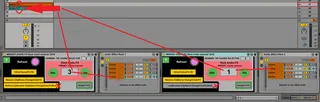
MIKADO AUDIO FX Rack chain selector 2018
Based on: ChaineActivatorMidi by morganjenks http://www.m...
- Type
- Audio Effect
- Author
- spiralune
- Version
- 1.0
- License
- None
- Live version
- 9.6.2
- Max version
- 6.10
- Downloads
- 668
- Updated
- 2021-07-22
MIKADO AUDIO FX Rack chain selector 2018 is an Audio Effect for Ableton Live by spiralune, distributed as freeware, with no license specified by the author. It targets Live 9.6.2 and Max 6.10. On maxforlive.com it has 668 downloads. First published 2018-02-19, last updated 2021-07-22. 16 user comments below.
New to Max for Live? Read what Audio Effects do, how device licenses work, how to install a device.
Description
Based on: ChaineActivatorMidi by morganjenks
http://www.maxforlive.com/library/device/3895/chainactivatormidi
Midi Instruments version here
https://maxforlive.com/library/device/4082
ATTENTION READ THIS FIRST
""RAck at the rigth of this patch is auto mapped to Chain Selector and no need assigned anything ""
""each chain selector need diagonaly assigned= 0-127""
""Clic REFRESH auto Num Number of Chain in the Rack""
---------------------------------------
this patch is use to make rack instruments or FX
to work as pseudo Program change .. with 128 preset
who eatch chaine selector is one preset ..
2 assignable up down Button preset chain selector
( preset up down .. loop end auto return to first)
1 assignable chain selector NumBox to rotary CC
chain can recall with a same number at the rigth off the CLIP Name ((bass funky 18 = recall chain 18)
up down directely recall adjacent preset just recalled
((17-19))
Save CPU Button =Other Chain FX OFF
auto desactivate all other plug or instruments in another Chain.
-------------------------------------------------------------------------
so eatch Rigth Number in the Named on eatch Clip on eatch Track on the scène recall All there specifics Preset Like a Groove box ..
Live Scène= Pattern
Number in the Clip name = Preset of that Track
each clip has its preset .. cool
and fun for Live with 8 Track ...
Because eatch track can have 0-127= 128 vst instruments at presets if you want
CPU friendly with Button= OtherFx OFF =AUTO desactivate All Plug to another Chain
--------------------------------------
iam use it to recall Ableton RACK audio FX Chain
add assignable midi -- inc / dec -- with loop the last chain to the first chain
number of chain auto detect when clic refresh ( chain number = 0 to 127 )
--------------------------
Lock clip name recal a chain
Add Button =NoReceive-ClipName-ChangeChainFX
=Receive-ClipName-ChangeChainFX
------------------------
Button=LastNumber-ClipName-ChangeChainFxRack
= BeforeLastNumber-ClipName-changeChainFxRack
add ability to have 2 number at rigth off Clip Name
can recall corresponding Chain selector on two RAck FX ..
with TWO off this patch in the same track
Fun in use with ""MIKADO chain selector 2017 1.0"" midi instruments version
Last number in Clip Name recall Intruments Chain
and FX version ON= BeforeLastNumber-ClipName-ChangeChainFxRack
recall with a BeforeLastNumber in the ClipName
Audio or Midi clip name : Bass Tribe 14 33
BeforeLastNumber recall chain 14
and lastNumber recall chain33
---------------------------------------
or Two OF THIS FX audio version with TWO FX RACK in audio Track
first Button= BeforeLastNumber-ClipName-ChangeChainFxRack
and second Button = LastNumber-ClipName-ChangeChainFxRack
------------------------------------------
Number at the end of clip name recall this chain
exp1: only one patch and one FX Rack
Button =Receive-ClipName-ChangeChainFX
Button = LastNumber-ClipName-ChangeChainFxRack
Audio or Midi clip name : Bass Tribe 14
Button inc / dec direct recall good next / preview chain = so 13 or 15
------------
exp2: Two patch and Two RAck FX
Button =Receive-ClipName-ChangeChainFX
on First PAtcher For first RackFx
Button = BeforeLastNumber-ClipName-ChangeChainFxRack
on Second Patcher For second RackFx
Button = LastNumber-ClipName-ChangeChainFxRack
Audio or Midi clip name : Bass Tribe 14 33
BeforeLastNumber recall chain 14
and lastNumber reacall 33
------------------------------------------
exp2: 33 Bass Lead 23 = call chain 23
(( Number must be at Right !!! Because ??
Ableton auto Name new Clip Recorded and
set number at LEFT
and need avoid new rec midi clip to interact with the chain )) cool
-------------------------------
button " OtherChainFX-OFF "
desactivate all plug to all other chain
you can select " OtherChainFX-ON"
if you pc have good proc and ram
and you need extrem reactivity at extra low latency
without draoput and click when need to change quickly preset , Even while continu to playing
-------------------------------------
Add ,, Send ALL Note OFF and Pedal Sustain OFF
at change ((prevent note blocked))
---------------------------------------------------------------------
To avoid reconfiguring your midi controller button
Button assign to midi note or midi CC ((no noteoff))
if assigned ""inc /dec "" from controller::
-- need double clic to work correctly
-- or clic once , jump two chain
try another .. button position
it's save with ableton project
Comments (16)
First, I will be more patient in understanding the instructions here, as they are very thorough. But the sentence structure and phrasing is rather fragmented, as technical float-over info text tends to be, and I cannot from your initial statement understand what this device is accomplishing.
If you have 4 chains, couldn't you either assign the chain to a note range on a midi channel? then tap a corresponding pad? Or couldn't you in the example of 4 chains just distribute them evenly across the full range and use 4 positions on one dial? Why do I need to use this device? What user case scenario does this device solve? When does it become immediately obvious that this device is the way to address a problem?
check this first
http://maxforlive.com/library/device.php?id=4082#LastComments
yes have made this patch for pseudo Program Change
and recall easy a specifique instrument one chain at a time
and this version is for pseudo program change chain FX rack
and need diagonal chain selector assigned
recall chain via Number at the rigth off Clip Name
ect... try this instrument version first concept his more evident
and iam french with very bad english sorry
i am need to more explicite in description
thank
I am update de description and jpeg
i hope that you help
Serait il possible de rafraichir automatiquement à chaque mouvement ?
Comme ici il me semble:
https://cycling74.com/forums/help-chain-selector-auto-onoff-device
Hi Spiralune !
Would it be possible to refresh the device automatically ?
It seems this device auto-refresh:
https://cycling74.com/forums/help-chain-selector-auto-onoff-device
PS: Sorry for the double post !
Pierre
thanks good idea
i see and coming soon update
effectivly my patch need manualy clic refresh when number of chain as change
WeirdNoise as implement auto refresh
but are less possibility
thank you for this info
First off this is an awesome device.
I have an idea for a small edit to your patch.
Basically Im using two of them to fade between racks of m4l FX. I do this by putting two racks full of FX inside of another rack and putting fades on the chain selector regions. I put one of your devices before each of the FX racks full of devices. Essentially a rack of racks. The problem I have is that your device wont properly refresh wile inside of another rack (which makes sense). My current solution is to pull your device out of the rack, (along with its corresponding FX rack) refresh it (so it links to the clip slots to the FX rack) and put it back into the rack (rack of racks). I hope that's not to confusing.
While I can make it work to fit my needs, I'm wondering how hard it would be to update the device so that you could refresh it wile INSIDE of another rack...
Thank you for taking the time to read this. Please let me know if I can better explain myself.
The Max console says: "$" variable out of range (1)
ok i don't have live 11
I will try to solve this problem
thanks
COULD YOU ADD AN OPTION FOR YOUR DEVICE TO REACT TO EXTERNAL INCOMING PROGRAM CHANGE FROM AN EXTERNAL DEVICE?