- Type
- MIDI Effect
- Author
- synthesizerwriter
- Version
- 0.02
- License
- None
- Live version
- 10.1
- Max version
- 8.0.6
- Downloads
- 1,879
- Updated
- 2019-07-10
Drum Flammer is a MIDI Effect for Ableton Live by synthesizerwriter, distributed as freeware, with no license specified by the author. It targets Live 10.1 and Max 8.0.6. On maxforlive.com it has 1,879 downloads. First published 2018-10-27, last updated 2019-07-10. 3 user comments below.
New to Max for Live? Read what MIDI Effects do, how device licenses work, how to install a device.
Description
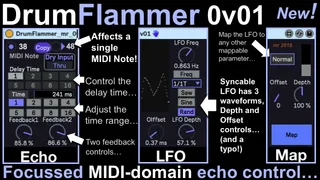
This is a tweaked version of 'Note Echo' from the Ableton Live 9 'Max For Live Essentials' pack. This version exploits the MIDI-domain echo to provide flexible control over the 'reverse' flamming of just one note pitch. Although this is traditionally used on drum sounds, it is also effective (in moderation) on other sounds.
To use it, you select the MIDI note number that you want to manipulate, select the Time mode (only one grid will be lit up), and Drum Flammer will pass everything except that single pitch straight through. Your chosen MIDI note number will be echoed with the delay time varied by an LFO, and with feedback applied in the MIDI domain instead of the more usual audio domain (so there's none of the noise build-up that you get at high feedback values).
At low delay times, you get the characteristic metallic flutter echo effect that I have heard lots of people colloquially call a 'flam'.
By either syncing or free-running the LFO, you can get rhythmic/repeating or arhythmic/non-repeating changes to the sound produced by whatever Instrument (or Rack) follows this device.
This is version 0.02, trying to fix a reported problem with the 'Copy' button (I couldn't reproduce the problem myself). Experienced users of my devices will know that I release early, and refine gradually (and sometimes slowly-sorry!). I like trying out ideas, and I hope that you do too!
Comments (3)
However for me the "Copy" button is always toggled, which makes the notes to all be echoed. The only workaround to echo just one note is to keep the button clicked with the mouse, or map it to a controller...