Track Controller
Allows you to control the volume, solo, mute, record, send 1...
- Type
- MIDI Effect
- Author
- moss
- Version
- 1.2
- License
- None
- Live version
- 8.2.7
- Max version
- 6.0.2
- Downloads
- 6
- Updated
- 2011-12-25
Track Controller is a MIDI Effect for Ableton Live by moss, distributed as freeware, with no license specified by the author. It targets Live 8.2.7 and Max 6.0.2. On maxforlive.com it has 6 downloads. First published 2010-12-22, last updated 2011-12-25. 7 user comments below.
New to Max for Live? Read what MIDI Effects do, how device licenses work, how to install a device.
Description
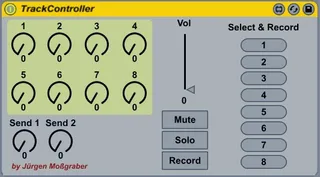
Allows you to control the volume, solo, mute, record, send 1 and 2, the first 8 controls of the currently selected track. To use it
1. create a midi track (e.g. call it utility)
2. load the track controller plugin into it
3. midi learn all or some of the controls of the plugin to you midi controller
4. select the track to control and tweak
Note: The 8 device knobs control the device parameters 2 to 9 (1 is the on/off-switch) of the first plugin of the selected channel. This is intended to be used with a rack. Wrap all plugs of the channel into a rack and map its 8 controls to your preferred controls of the individual track plugins.
The 8 Select & Record buttons allow you to switch to the specific track and enable it's record button, all other tracks record button will be disabled automatically.
New in V1.2:
- Adapted to Max 6 (still works with 5)
- Support for all Live devices (not only racks)
Comments (7)
I use your track controller and would need the following:
Have an integer switch the track ID number instead of the selected track defining this ID. Where in the code would that be done?
manu
T
> a editable version would be nice.
It is editable. Just select "Unfreeze device".
> Have an integer switch the track ID number instead
Send your integer to the "prepend selectAndRecordTrack" box. This is where the 8 buttons are connected to.
I may be missing something really obvious becasue I'm super new to m4l but the download link on your site is to a zip file that just contains a .js file whereas the others are .amxd files.
Where do I find the device file (or what do I do with the js file?) - this device looks like exactly what I need for a starting point so would be very grateful if you could help me out
-Thanks!
Tim
I have the same problem as Tim, the download contains a .js file and nothing else, is this right?
Cheers,
Stax,
Great gear, but same request, no amxd file on your web site...