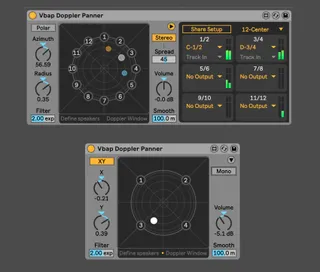
Vbap Doppler Panner
2D Surround doppler panner based on Ville Pulkki's vBap(vec...
- Type
- Audio Effect
- Author
- alkman
- Version
- 1.1.5
- License
- AttributionNonCommercial
- Live version
- 10.0.5
- Max version
- 8.0.3
- Downloads
- 5,487
- Updated
- 2021-11-18
Vbap Doppler Panner is an Audio Effect for Ableton Live by alkman, distributed as Creative Commons Attribution-NonCommercial. It targets Live 10.0.5 and Max 8.0.3. On maxforlive.com it has 5,487 downloads. First published 2019-01-07, last updated 2021-11-18. 11 user comments below.
New to Max for Live? Read what Audio Effects do, what the AttributionNonCommercial license means, how to install a device.
Description
2D Surround doppler panner based on Ville Pulkki's vBap(vector base amplitude panning) spatialisation algorithm. It shares many ideas with ableton's Surround Panner and E4L's Source Panner(ambisonics). This one though uses much less CPU and in contrast with the other two allows for custom speaker arrangments and doppler shift simulation.
You can use the predefined speaker arrangments or define your own coordinates in degrees(-180,180 or 0, 360) in the text editor. Supports up to 12 channels with per-channel routing and shared output routing when using multiple instances of the device.
There is also a cheap highpass filter and a variable delay for simulating distance placement outside the surround field (0 value = filter off) and doppler shift.
Paper on Vbap: http://lib.tkk.fi/Diss/2001/isbn9512255324/article1.pdf
original Vbap object by Ville Pulkki 1999-2003 / updated by Christophe Baratay
Requires Ableton 10.xx and max for live 8.xx
BECAUSE IN MOST CASES YOU DON'T WANT TO SEND THE DRY SIGNAL TO THE MASTER TRACK, THE DEVICE AUTOMATICALLY ROUTES THE OUTPUT OF THE TRACK TO "SENDS ONLY"(YOU CAN SWITCH IT BACK TO "MASTER" MANUALLY). AFTER DROPPING THE DEVICE TO A TRACK CLICK THE TOP-RIGHT ARROW TO OPEN THE SETUP WINDOW AND ROUTE THE OUTPUT OF THE DEVICE TO ANY OTHER TRACK.
*Update 1.1.5 *
--- New RMS meters on the output section for monitoring stereo pairs
--- GUI elements are not rendered blurry on non-retina monitors.
*Update 1.1.4 *
--- Updated Vbap external which solves the issues with macOs Catalina or later
*Update 1.1.3 *
--- Fixed the "wrong id" error that was popping up in console on initialisation
--- In order to have less graphical elements updating on each circle, angle position is removed
*Update 1.1.2 *
---minor performance improvements
---new graphics for the surround field
*Update 1.1.1*
---Fixed a bug where the undo buffer was filling up when XY parameters were controlled by a live.object or live.remote.
--- Doppler processing is turned off when the effect is deactivated
---Minor graphics improvements. Live colors are updated according to ableton's skin
*Update 1.1*
---Using new 64-bit Vbap external by Christophe Baratay which fixes a memory corruption.
---Added doppler effect and doppler window with pitch and volume parameters.
---Distance parameter can now record its automation but will also fill up the undo buffer(enable this only when needed)
---Added description of parameters for the info view.
---Should be more stable on windows(not tested, please give feedback)
---Extended smooth(ramp) millisecond range
---General cleaning up
*Update 1.0.1*
---Custom speaker values can now be shared between different instances of the device
---Fixed an issue where the filter was not turning off
Comments (11)
Am I missing something?
Note that if you add LFOs devices to make sources move, for example, it's working but then you'll fill the undo buffer quickly.
It seems that there is currently no workarounds for that, if you still want to be able to automate.
(Unless adding custom LFOs inside the M4L device, which would be a great addition)
However, at the moment it, if you attach some LFOs devices to parameters, it will crash Live everytime the Live Project is closing.
This is annoying, but no crashes otherwise.
Anyway thanks for the work !
Thanks!