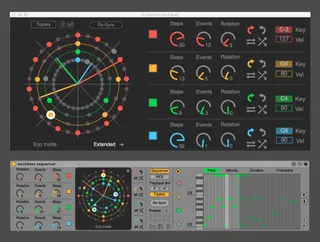
Euclidean sequencer
Euclidean sequencers divide a number of beat subdivisions ov...
- Type
- MIDI Effect
- Author
- alkman
- Version
- 1.1
- License
- Commercial
- Live version
- 10.1.2
- Max version
- 8.1
- Downloads
- 0
- Updated
- 2025-06-30
Euclidean sequencer is a MIDI Effect for Ableton Live by alkman, distributed as a commercial (paid) device. It targets Live 10.1.2 and Max 8.1. First published 2019-12-10, last updated 2025-06-30. 86 user comments below.
New to Max for Live? Read what MIDI Effects do, what the Commercial license means, how to install a device.
Description
Euclidean sequencers divide a number of beat subdivisions over a time interval and place MIDI notes as evenly as possible into the sequence. This is a 4 voice euclidean sequencer, for ableton and max for live. Creates complex polymeters and melodic arpeggios. Amongst other things it allows to have a fixed note per voice, or create your own melodic sequence for each one.
Requires max for live & ableton 10.1.2 or later
Demo video :
https://www.youtube.com/watch?v=cR9L9CrbHzo&feature=youtu.be
review videos:
https://www.youtube.com/watch?v=s2drgThbQgY&t=553s
https://www.youtube.com/watch?v=aZ2J-K2U9eY
Interesting music theory video that uses the device
https://www.youtube.com/watch?v=X0-zuS_62wc
More info on euclidean sequencers :
http://cgm.cs.mcgill.ca/~godfried/publications/banff.pdf
*Update 1.1*
— Fixed a bug which occurred in Ableton live 10.1.30, where parameter values and presets were not reopened correctly.
— Fixed a bug where an automated note box outputs wrong notes
— Preset number box can be automated and midi mapped
Check also Euclidean sequencer Pro:
https://maxforlive.com/library/device/7382/euclidean-sequencer-pro
Comments (86)
Cheers
@nulcearsugar, thanks !
If I click on any track other than the one with the sequencer on it, when I come back the sequencer is visibly eschewed and the bottom 10% of the plugin is no longer visible, meaning I can't press any of the buttons or see any of the values along the bottom.
Another issue I am having is that the presets do not work. I can save them but opening them does nothing.
These 2 issues together mean that any time I want to change anything in my project, I will need to delete this device and start it again from scratch as it will become unusable and I cannot load presets.
I can send you screenshots and am happy to help troubleshoot!
Thanks.
I'm embarrassed to ask but after some time, I still haven't been able to figure out how to export just the midi from the Euclidean Sequencer onto another midi track. Is this possible?
I've been able to record audio clips using the ES and an instrument, but I'd love to have just the midi so I can tweak it.
Thank you!
You can also use the incoming notes as live input for another instrument
Thanks for the response.
My Ableton Live and Max are both at the current versions but it looks like I have errors in Max, which I didn't realise until I tried to open the editor.
I guessing it's the Max issues I'm having that is causing the other issue.
I will get in touch with Cycling '74 support and update here. Cheers!
I made the following test : create a midi track and put the device on it. Enable the click. Create a clip in session view (say 2 measures) with a note spanning the 2 measures. Create a pattern, setting it to 8n playback. I expect that each time the clip is played (each time the note is on), the sequencer resets and start from the beginning of a cycle.
-> That is what happen but sometimes the cycle restart with a tiny delay and so all the notes are all out of sync.
I hope to be clear enough. :)
@mariodance
Very nice and intuitive (I think :) )
But I have found one issue.
I want change the pitch of one of the keys with an lfo. So I mapped the CV LFO of the CV tools to the pitch and tuned it so I see the pitch on the euclidian seq change between D4 and D#4 but the pitch sent out to the vst synth isn’t the same. It is C#4 and D4 and it doesn’t change in sync with what is represented on the screen.
I then tried grouping the euclidian seq so I could map macro controls to the pitch and the change those with the LFO but it is the same behaviour. Also when I move the macro ctr manually.
It seems to me, like the mapping affects the midi information first and the visual representation on the gui of the sequencer is an approximation of this. Instead of the mapping affecting the gui wich then tells the sequencer what pitch to trigger.
Thanks for reaching out and reporting the bug. An updated version with a fix and some new features is coming soon.
I am running live 10.1.7 and cannot get Euclidean Sequencer to generate any midi data. I have watched the demo video and have loads of events on Euclidean being swept by the clock hands as Live plays but no MIDI data is monitored on Live's MIDI track, nor detected by any instrument that gets loaded onto the channel.
Is there anything you could advise?
With thanks, Rob
I've been using this for a few weeks now and loving it, but it suddenly stopped putting out any audio. It's strange, if I open the Max edit window, the preview puts out sound, but when in an instrument rack it isn't working. Channel puts out audio as normal when I power off the Euclidean sequencer. Any help would be appreciated.
I should note this is also happening with a M4L LFO I have, so I don't think the issue is with your device particularly. Many other devices, both midi and audio effects, are working fine. I'm very confused.
Can you fix this please? I can't even work with this patch then.
Thanks.
Am I missing something ?
Secondly, it appears that there is currently no way to send each voice to a separate midi channel ? (this has already been asked by someone else ) To be able to do that would really vastly increase the possibilities, and I’m guessing should not be too complicated to implement ?
I would also second the suggestion of having a « toggle » between euclidean and a « click on the grid » mode, similar to LoopSeq for iPad ( I realise that that is probably not _at all_ a quick and simple addition, but if ever it is feasible, it would also enormously increase the power of the device !
Thanks for your great work !
basically i cannot change the number of events due to the fact every time that i try to change it, ableton immediately crashes, this happens on my windows pc as well as on my Mac with MacOS installed
Using Live 10.0.1 & max 8 on both of them
Can change the number of events on a deactivated sequencer but as soon as i activate the event-changed sequencer, live chrashes immediately
Kind regards
+1 for separate MIDI channel out
@weswook I would like to implement this too, but unfortunately, Ableton does not support internally separate midi channels. This is more of a design flaw. You can read more about it here https://cycling74.com/forums/midi-channels-in-m4l
First of all, the description specifically mentions polyrhythms which was a big reason I bought it. I was hoping that this could do those right out of the gate, with appropriate parameters inputted in of course. This is something that Live doesn't directly do, which is disappointing, but there are workarounds that you can use such as directly entering/manipulating/warping the MIDI notes (which results in crude/coarse timing) or using overdubbing with the stock arpeggiator in time mode (which requires some math for every polyrhythm desired, but I do find it personally hilarious that I have a disdain for doing that given the styles of music that I listen to/produce/write that require polyrhythms in the first place). After playing around with this for about a dozen hours over about two days, I have discovered that this is not the case with the Euclidean Sequencer. I would say that instead of doing straight-up polyrhythms in sync with the global time signature, it will do polymeters instead. While I can't make it do polyrhythms directly, you have to set it to the polymeter that reflects the intended polyrhythm (5 over 4 in 4/4 at 120bpm to get a 5:4 polyrhythm, for instance), print the MIDI to a track, and then warp it by hand from a phrase/clip length of five beats to four beats. This still puts you at the mercy of Ableton's quantizing, grid snapping, and note-length resolution limitations, however I will say that the end result sounds a bit cleaner than doing it all yourself manually. I guess I was hoping for something for straightforward that could be setup and run to achieve that goal without breaking the creative flow for that specific issue.
After doing some reading of the previous comments from the graciously helpful creator and the supplied paper on Euclidean rhythms, I don't know if this is even a valid feature to request but I would love to see it included. I dunno, but will confess that I am Max ignorant and not a programmer of any kind. I will also freely admit that maybe my expectations based on the description and the video demo may not have necessarily conformed to the actual reality of the tool, though.
Aside from that, saving and loading patches isn't working for me (Live 10.1.14 and Max 8.15), same with parameters resetting to initialized when saving and loading a Live set. I personally would also really like to see if there could be an option (like the random or shuffle buttons) for setting all sequencer note pitches per channel to the same note, like a C3 for the whole blue channel, etc. I've also found that if you use a MIDI effect rack with several channels after it, each with a stock MIDI pitch effect at different "accepted note range" settings, you can then route multiple instruments/MIDI channels to each colored channel, at which point you can do some wild stuff (I had a Mick Gordon/Doom 2016 thing going for a minute, which was dope). Also, if this device was ever at a point where you could use it to assign parameters on other effects and instruments to modulate, I would fear for the dryness and structural integrity of my jeans.
All in all, it's excellent and I would say 10 out of 10 for what it can do, but not what I was expecting going in. I would say that if you need what it can do, it's definitely worth the money. Thanks and I am looking forward to whatever you do in the future.
There's a problem with the track on/enable buttons where they are all disabled on opening the project. All other parameters look to have saved.
As an additional feature, would you be able to add separate clock divisions to each track please, rather than them using the same one? It would be great to have each track moving at separate timings. Thanks
Any info on this is appreciated, thank you .
I wish that in the round you could choose which steps sound and which don’t. I can only make him distribute it symmetrically.
That is, in a 4 event if we put 2 steps choose 1 and 3. I can't choose 1 and 2 for example.
I love this sequencer. It is a great tool, and I have used it on several tracks.
However, there seems to be a problem with it after the Ableton Live software update 10.1.30 that updates Max to 8.1.7.
When I open a saved project with the sequencer, it opens in a reset state without any of the changes I have made to it.
Does anybody else experience the same problem?
I confirm the issue is present on live 10.1.30.
A free update is coming out with a fix.
cheers
Also, would it be possible to add automation capability for "shuffle" and "randomize"? Or if it's there someplace please answer quick, I'm on a deadline!
thanks, loving it otherwise.
- Glad to hear Random is coming - assume that would be a per channel random note select?
- Is there a way to send the different patterns to other devices/midi channels or did I miss how to do that?
Random will be per channel-voice.
Midi routing per voice is also coming soon.
:)
Thanks
I just bought the device. I was under the impression through reading the comments that the MIDI button allows for the sequencer to be progressed with MIDI notes. But in fact, it seems the sequencer is re-synced when it receives a MIDI note.
That's a shame, because I was hoping to add some swing to the patterns by using MIDI clip with swung patterns.
Any chance that could be implemented as a feature?
I love creating custom swing patterns (by shifting microtiming manually, not just a swing %) and would love if steps in this sequencer could be progressed with midi notes (acting as trigs/gates). What do you think?
However, it would still be immensely cool to have a mode when the sequencer can be progressed with each successive midi note from the midi clip. Or at least a simple "swing" setting, failing that.
If I assign a controller button to "resync" and then try to use it, it triggers all the "resync" buttons of every instance of the device grouped together. This seems to cause a loop of the "resync" buttons all triggering each other until a crash occurs.
The device crashed all the time, Why? Thanks!
Can i get a refund for this one?
- Are triplet notes supported independently for each of the four voices, so for example one voice could have a triplet pattern and another could not, or is it a global setting, in which case my example would need two separate instances of the sequencer?
- Are dotted notes supported, and if so is that independent by voice or a global setting? If dotted is not yet supported, could it be added in a future version?
- Otherwise is dotted supported in the pro version of the sequencer?
Thanks! :)
I wish a VST version to use it with another DAW
Thanks!
Im trying to download the Euclidean sequencer PRO 1.2 but the "I want this" button does not seem to work so can't put it in my basket: https://alkman.gumroad.com/l/EuclideanSequencerPro?_ga=2.17245497.1028334750.1638736394-269178647.1638736394&_gl=1*yu2apq*_ga*MjY5MTc4NjQ3LjE2Mzg3MzYzOTQ.*_ga_6LJN6D94N6*MTYzODczNjM5NC4xLjEuMTYzODczNjYzNy4w
I need your help ,
I bought euclidean sequencer on the appstore, and I find myself with an icon in "application", but I don't know at all how to integrate it into ableton (I have a mac book air M1, so it should work ). Could you help me ? I've been trying for weeks and no one knows how to do it!!!! very frustrating