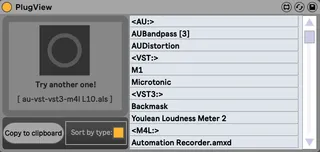
PlugView
This device populates a list of VST/VST3/AU plugins and M4L ...
- Type
- Audio Effect
- Author
- VKondakoff
- Version
- 1.5
- License
- Commercial
- Live version
- 10.0.1
- Max version
- 8.0.3
- Downloads
- 1
- Updated
- 2020-06-30
PlugView is an Audio Effect for Ableton Live by VKondakoff, distributed as a commercial (paid) device. It targets Live 10.0.1 and Max 8.0.3. On maxforlive.com it has 1 downloads. First published 2019-01-09, last updated 2020-06-30. 9 user comments below.
New to Max for Live? Read what Audio Effects do, what the Commercial license means, how to install a device.
Description
This device populates a list of VST/VST3/AU plugins and M4L devices which were used in any Ableton Live session.
Use this device when you want to parse several livesets trying to find these with (or without) the specific plugins. This is useful when you are switching plugins, changing plugin versions or preparing to share the sets. Livesets are not actually loaded into Ableton Live, PlugView is parsing them 'on the fly', so the process is quite quick.
Usage: load Ableton Live session (als-file) of your choice by dropping it into PlugView window or by clicking on a big file chooser button. The list of VST/VST3/AU plugins and M4L devices which were used in this Ableton Live session will be displayed in a grid, sorted and counted. Now you can copy this list to system clipboard for further processing. You don’t need to actually open the live set in Ableton Live to populate the plugins list. Just drop any als file from Ableton Live browser or Finder/Explorer into PlugView window.
I'm pretty sure this is the first M4L device which extensively use Node For Max.
PlugView was tested to work in Ableton Live 10/Max 8.0.3 (macOS Mojave/Windows 10). Note, please, Max 8.0.3 (or later) is required to run PlugView.
Short video: https://youtu.be/wdl3eepiWCA (introduction)
https://youtu.be/k06zGXXfClo (copy plugins list to system clipboard)
Price: $1
Purchase: https://gum.co/IZnyD
Version 1.0 (Jan 2019)
- Initial release
Version 1.1 (March 2019)
- Program logic enhancements
- Cosmetic changes
Version 1.2 (May 2020)
- Copy plugins list to system clipboard
- Small fixes
Version 1.3 (June 2020)
- Now PlugView lists AU-plugins correctly
Version 1.4 (June 2020)
- VST3 plugins are included in the list
- Fixed an issue when ‘Default.aupreset’ appears as AU-plugin in he list
- Code cleanup
Version 1.5 (July 2020)
- New option to sort plugins list by their type (AU/VST/VST3/M4L)
- Small fixes
Here you can view my other M4L devices: https://gumroad.com/valery_kondakoff
Comments (9)
https://maxforlive.com/library/device/2045/playlist
...to add text file output, but am not having much luck. Keeps crashing Max. Any chance you can add this feature?
I have sent an email to your gmail in August.
I saw your comment under an old maxforlive plugin.
coulsounds - Sync Tool and Synchronisation Pack 1.0
https://maxforlive.com/library/device/1756/coulsounds-sync-tool-and-synchronisation-pack
It's not on sale right now, if you have it, I'll be glad if you email it to me.
My email; [email protected]
I bought it some months ago, but I found an issue : at some point, when the Live set is too big, it doesn't work anymore and just doesn't display anything...
I sometime use very big sessions, especially on stage, and on these big sessions (when the .als file is more than 10 Mo I would say) plugview doesn't work at all and doesn't show any plugin...
Is there a possible fix to this issue ?