a better search for max devices
Fluctape screenshot

Fluctape

by meshgarden

Inspired by analog pedals, Fluctape creates tape-like random...

View on maxforlive.com Website

Type
Audio Effect
Author
meshgarden
Version
1.1
License
Commercial
Live version
9.5
Max version
7.2.4
Downloads
0
Updated
2019-10-03

Description

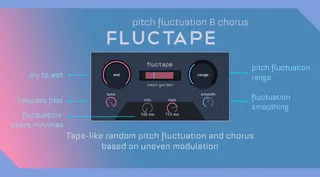
Inspired by analog pedals, Fluctape creates tape-like random pitch fluctuations and chorus based on irregular intervals.

You can also decide the min/max random event time and the pitch fluctuation range.

Featuring:

Wet/Dry knob

Lowpass filter

Pitch fluctuation range

Fluctuation smoothing

Pitch fluctuation min/max event

All parameters mapped to Push knobs

and MIDI mappable

Version 1.1 free update: all the knob parameters are saved in the project.

Audio demos at the link below.

Comments (14)

  • CaligulaCuddles · March 09 2019
    Hey, I really like the look of this.
    I actually posted a somewhat similar patch recently, but I'm stil gonna snag this because I love seeing how other people approach this style of audio manipulation.
    And I totally agree with the philosophy of irregular fluctuation intervals; the typical wow & flutter approach of basic sinusoidal modulation just doesn't capture that analog magic like something more complex and erratic.
    Props on the design. Great job, man!
  • b22 · March 09 2019
    I´d liked to buy your device, but gumroad forces me to allow them the right to catch money from paypal from now on for ever, that`s not what I want. Neither I have a credit-card. Possible to pay per paypal f&f? Or any other way (I live in Germany). Bernhard
  • meshgarden · March 10 2019
    @CaligulaCuddles: Thank you very much!
    @Bernhard: Could you please write us a pm on our Facebook page?
  • b22 · March 13 2019
    I have no fb-account, you can write me on b.becker at b22.de
    thanx!
  • dekmantel · March 20 2019
    @Bernhard: gumroad is a pain in that regard. what you could do (in case an author is not as responsive as meshgarden;) ) is link your bank account to paypal, allow gumroad to do their intrusive thing, but then remove that permission as soon as you have the device. still, it is a pointless bother indeed...
  • dekmantel · March 20 2019
    & purchased. it's perfect!
  • meshgarden · March 21 2019
    @Bernhard: the only solution at the moment seems to be using a prepaid card not linked to your bank account.
    It's a Paypal rule, we can't change it, sorry.
    We don't know about the solution posted by dekmantel ;)
    Thank you guys for the 5 stars ratings on Gumroad! :)
  • b60231 · June 29 2019
    Doesn't seem to save states as of Live 10.1 running Max 8.0.6
  • meshgarden · July 29 2019
    @b60231: The device doesn't save the parameters in the live set, as we say in the instructions file. This is a choice to give the device an analog feel, so it's not a bug. Thanks.
  • b60231 · August 16 2019
    @meshgarden - it might be a good idea to put that in the product description, so that users might not be disappointed or frustrated when working on projects.
  • dekmantel · September 26 2019
    @meshgarden - hm indeed, one only receives the instruction file after buying the product, so it's probably better to mention this in de description, as it is quite a bother having to adjust the parameters on all instances of the device every time you open a project.
    but i will try and add the state save in my copy, unless that is something that is already planned for a future update.
  • meshgarden · September 29 2019
    @b60231 @dekmantel sorry for that. I am considering an update with parameters saving. In the meantime I will add that info as you suggested, thanks.
  • meshgarden · October 03 2019
    Hi, the updated device with state saving is out now, please go to your Gumroad account to download it for free. Thanks for your feedback.
  • dekmantel · October 07 2019
    awesome! thanks so much

← Back to search