Track Stats
Track Stats is an Ableton Live Project analysis system that ...
- Type
- Audio Effect
- Author
- tomcosm
- Version
- 1.0
- License
- None
- Live version
- 10.0.1
- Max version
- 7.3.5
- Downloads
- 0
- Updated
- No Updates
Track Stats is an Audio Effect for Ableton Live by tomcosm, distributed as freeware, with no license specified by the author. It targets Live 10.0.1 and Max 7.3.5. Published 2019-03-19.
New to Max for Live? Read what Audio Effects do, how device licenses work, how to install a device.
Description
Track Stats is an Ableton Live Project analysis system that quietly keeps track of your production habits.
Video : https://youtu.be/U2lWQ0lPxY0
Get it here : https://gum.co/mNblE
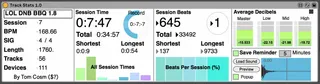
It records how long you've spent working during a particular tune writing session, how many beats you've played during that session, the total time of all sessions combined, total beats of all sessions combined, and the shortest and longest of each.
The graph below the Time area displays all sessions so far and their relation to each other, while the beats graph shows the percentage of each session.
On the left we have some general stats such as Track Name, Session number, BPM, Time Signature, Song Length, Number of Tracks and Number of Devices.
On the upper right is an average decibels area, which constantly updates as you work so at the end of the session you can see where you're main focus has been.
On the lower right there is a Save Reminder. By turning this on and specifying a time in minutes, the device will play a sample you choose over and over at the interval specified. You can also enable a popup window.
Track Stats is free or pay what you want.
Thankyou so much to my Patrons who suppoted me while I made this content. You are the reason I can release stuff like this for free - http://www.patreon.com/tomcosm
Bugs? Suggestions? https://discord.gg/MtandG5