Selection Filter
NOTE: This device is deprecated. The newer version is Select...
- Type
- MIDI Effect
- Author
- dennisdesantis
- Version
- 1.0.2
- License
- None
- Live version
- 10.1.7
- Max version
- 8.1.0
- Downloads
- 2,165
- Updated
- 2022-02-01
Selection Filter is a MIDI Effect for Ableton Live by dennisdesantis, distributed as freeware, with no license specified by the author. It targets Live 10.1.7 and Max 8.1.0. On maxforlive.com it has 2,165 downloads. First published 2019-12-31, last updated 2022-02-01. 9 user comments below.
New to Max for Live? Read what MIDI Effects do, how device licenses work, how to install a device.
Description
NOTE: This device is deprecated. The newer version is Selection Filter 2 (https://maxforlive.com/library/device/7871/selection-filter-2)
This version of the device should only be used if you must use versions of Live 11 older than 11.1, but please note that it will no longer be updated.
---
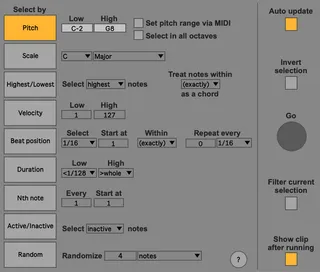
Selection Filter selects notes in MIDI clips based on their musical properties.
Selection Filter allows notes to be selected according to nine types of musical criteria:
Pitch — select all notes within a range of pitches
Scale — select all notes that are members of the chosen scale
Highest/Lowest — select the highest (or lowest) note of every chord
Velocity — select all notes within a range of velocities
Beat position — select notes that begin at a particular rhythmic location within a bar, and then optionally at multiples of that position
Duration — select notes within a range of note lengths
Nth note — select every Nth note, with an optional offset
Active/Inactive — select all notes that are unmuted (or muted)
Random— randomly select a fixed number or a percentage of notes
Comments (9)
One suggestion: The font looks pretty smeared / non highdpi on my screen, any way to improve this for legibility?
Probably a big ask, but updating it to support Live11 and mpe would be highly appreciated and I would definitely donate or pay for that.
Currently Live shows the warning that the device "is using an older process to modify midi notes. This can lead to a loss of additionalnote data..."
Unfortunately, it's not actually possible for me to update this to be completely compatible with Live 11 yet. The "older process" referred to in that warning dialog is the only way to affect the selection of notes. The updated method for working with notes supports MPE, but it doesn't allow note selection to be managed.
As soon as it becomes possible for me to update this, I will!
Best,
Dennis
Any update on a Live 11 version? I'm getting some strange behaviour. When 'Auto Update' is on you can't remove newly recorded clips & 'Show Clip After Running' seems to shift focus away from other clips back to the processed clip permanently after running a process.
Thanks, Pat.
The Live 11.1 beta was announced today, and I'm working on a version of the device that I thing should solve all of the compatibility issues with Live 11.
If you're testing 11.1 and would like to try out the updated version of the device, please let me know.
Best,
Dennis
Please use https://maxforlive.com/library/device/7871/selection-filter-2 if you're using Live 11.1 or higher.
Best,
Dennis