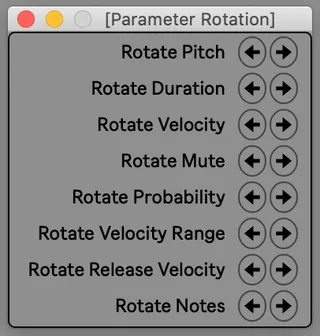
Parameter Rotation2
Rotates the pitches, durations, velocities, or other single ...
- Type
- MIDI Effect
- Author
- dennisdesantis
- License
- None
- Live version
- 11
- Max version
- 8.1.9
- Downloads
- 1,302
- Updated
- 2021-01-09
Parameter Rotation2 is a MIDI Effect for Ableton Live by dennisdesantis, distributed as freeware, with no license specified by the author. It targets Live 11 and Max 8.1.9. On maxforlive.com it has 1,302 downloads. First published 2017-06-09, last updated 2021-01-09. 7 user comments below.
New to Max for Live? Read what MIDI Effects do, how device licenses work, how to install a device.
Description
Rotates the pitches, durations, velocities, or other single parameters of the selected MIDI notes to the right or left, leaving all other note parameters untouched.
version 2
Dennis DeSantis
January 10, 2021
The concept of pitch rotation is discussed in the chapter "Creating Variation 3: Note Transformations" in my book 'Making Music: 74 Creative Strategies for Electronic Music Producers.'
Notes:
1) Weird things happen if you try to rotate pitches with chords selected; it's best used for monophonic lines (and this is really the only context in which pitch rotation makes sense anyway.)
2) When rotating durations, notes may become long enough to extend into an existing note of the same pitch. In this case, the extended note will be shortened so as not to destroy the next note. This means that your durations may *change*.
Changelog:
0.6 - If no notes are selected, all of the notes in the clip are selected automatically. If the clip contains no notes, nothing happens.
0.8 - Velocities and durations can also be rotated. Changed name of device accordingly.
2 - Updated to work with new note parameters added in Live 11 (probability, velocity range, release velocity). Additionally, any per note/MPE parameters (slide, pressure, etc.) will be retained when rotating other parameters. When using Parameter Rotation in versions of Live earlier than 11, these new parameters won't be accessible.
This device replaces Pitch Rotation (http://www.maxforlive.com/library/device/2922/pitch-rotation).
Comments (7)
your patch id really examplary.
anyway, super nice
I *think* duration is working as expected, but bugs are certainly possible! Can you send me a Set or a video that demonstrates what you're experiencing, and what's not working as you expect?
One thing - the device doesn't really have anything to do with the start and end markers in the clip. It operates on the selected notes (or every note if there's no selection), no matter where they are in the clip.
Best,
Dennis
best
As far as I can tell, the device is still working in the latest version of Live 12. Can you tell me more about what specifically you're trying to do, and what's not working?
Thanks,
Dennis