a better search for max devices
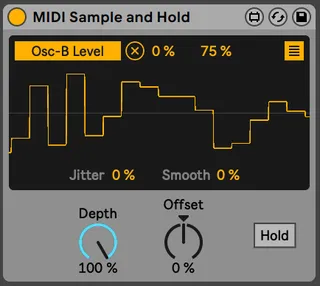
MIDI Sample and Hold screenshot

MIDI Sample and Hold

by dennisdesantis

MIDI Sample and Hold is a modified version of Live’s gener...

View on maxforlive.com

Type
MIDI Effect
Author
dennisdesantis
Version
1.1
License
None
Live version
11
Max version
8.1.9
Downloads
3,384
Updated
2021-02-21

Description

MIDI Sample and Hold is a modified version of Live’s generic modulation LFO. Rather than sending a continuously varying modulation signal, MIDI Sample and Hold sends a single random value with each incoming MIDI note.

(Thanks to Noah Pred for the idea.)

Version 1.1

Dennis DeSantis

February 15, 2021

Changelog:

1

Initial release

1.1

Improved Hold behavior

Comments (18)

  • Syn · February 01 2021
    Every modular needs a sample and hold LFO. Thanks. Getting this.
  • DUSCHEK · February 03 2021
    So handy,Cheers!
  • Drewskee · February 18 2021
    This is a VERY useful device indeed...thank you!
  • Drewskee · February 18 2021
    I dunno if this would be possible, but it would be really cool to be able to have it generate a different value for each mapped parameter but keep the GUI simple. Personally I don't need to "see" each value, just be able to constrain the Lo/Hi values as you already provide. Maybe just a button that says "S/H Per Map" or "Per Map Value" that turns it on and sends/generates a different value for each mapped parameter...oh, I think I said that already! :-)
  • dennisdesantis · February 19 2021
    Hi Drewskee,
    I wonder if a better solution for this particular case would be to use multiple instances of the device, rather than one mapped to multiple parameters. Since the device also passes the raw MIDI note, any additional instance further down the chain will create a different random value.
    What do you think?
  • TGTB · February 21 2021
    Hey I just got this and I am getting this error "bpatcher: bpatcher: error loading patcher MapButton.maxpat"
    does anyone have a solution? this is literally the perfect S&H that I have been looking for for months but I can't map it to anything lol
  • TGTB · February 21 2021
    Hey just re-downloaded and it works!
  • psynical · March 01 2021
    great device, but i do wish that all m4l mapping targets had Min Max + Offset.
  • DUSCHEK · August 07 2021
    Much fun ! cheers
  • pluto · June 01 2022
    Hey great device , can you make an option to loop the state when need it, having a few midi learn buttons freez half a bar, a bar, 2 bars, 4, bars 8 bars and orher you may prefer :) this will be great for live performances :) thanks
  • Yogen · June 06 2022
    Hi there! Thank you for making this device :)
    I modified it a little bit to suit my needs, adding the possibility to influence the output value with the input MIDI Note if anyone is interested :)
    All the best :)
  • dennisdesantis · June 07 2022
    Hi pluto,
    I'm not sure I understand your request. Is the idea that it should capture a certain number of random values and then repeat them? There isn't really a "state" at all right now; it just picks a new random value when it gets a new note. So there's no way to determine how many values would be in the loop. Something like a parameter sequencer would probably work better in this case.
    Best,
    Dennis
  • pluto · September 09 2022
    @dennisdesantis sorry for my late reply, yes is possible just simple counting half or 1 or 2 bars from the moment is pressed tge loop function and after press that interval is looped in sync with the ableton bpm, in does matter how/what values are included, this Pamela’s workout module feature from eurorack, very useful for creates moments and even melodies if quantized to a scale ;) belive me this will add a great value to it :)
  • njassal · September 11 2022
    Love this device. Any chance we can get one for audio?
  • pluto · September 12 2022
    @denissdesantis sorry for my previous confused message, I just want to be able to “freez” a state of the sh by a press of a button on my midi controller so it will repeat that modulation function to a selected lenght: half a bar, 1 bar, 2 bars, 4 bars. (Actually a button for every length will be ideal for tge midi controller). When preseed again the same lenght value then is going back to the evolving sh routine
    I hope now make more sense, thank you
    Ps: i dont care if is looping the previous bars or the next one after pressing the button, how is easiest for you to implement (if is the same for you then previous one make more sense)
  • pluto · September 12 2022
    @njassal "Love this device. Any chance we can get one for audio?" amazing idea! :)
    @denissdesantis great idea from njassal but don't know how snappy can be the audio to midi conversion, I always felt the max4live audio to midi devices have an impossible to use lag/delay... maybe you find a way not to have it
    so the audio stream is analyzed and the device reacts just to a a particular volume threshold that can be established with a parameter. if you'll succeed this device it will be huge! :D
  • Drewskee · December 14 2022
    I wonder if a better solution for this particular case would be to use multiple instances of the device, rather than one mapped to multiple parameters. Since the device also passes the raw MIDI note, any additional instance further down the chain will create a different random value.
    What do you think?
    Yes, yes...that would work. Never get notified that someone replied to a comment so thank you!
  • ManifestAudioLLC · September 13 2023
    @njassal - if you want to try and audio-triggered S&H modulator, along with a somewhat more advanced implementation of Dennis' brilliant device here, check our free Mod Squad bundle here: https://maxforlive.com/library/device/7518/mod-squad

← Back to search