Routing Mapper
Video: https://www.youtube.com/watch?v=prgwnn1Fymw Th...
- Type
- MIDI Effect
- Author
- NickHydeViolin
- Version
- 1.0
- License
- Attribution
- Live version
- 10.0.1
- Max version
- 7.3.5
- Downloads
- 0
- Updated
- 2021-05-18
Routing Mapper is a MIDI Effect for Ableton Live by NickHydeViolin, distributed as Creative Commons Attribution. It targets Live 10.0.1 and Max 7.3.5. First published 2020-03-27, last updated 2021-05-18. 3 user comments below.
New to Max for Live? Read what MIDI Effects do, what the Attribution license means, how to install a device.
Description
Video: https://www.youtube.com/watch?v=prgwnn1Fymw
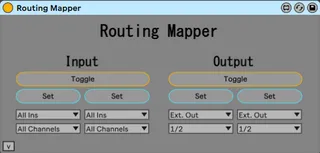
The Routing Mapper is a Max for Live device that allows you to Key/MIDI map changes to a track's input/output routings. It operates on whichever track it is currently on. To use, simply select the input/output routings on the device, and Key/MIDI map the button
You can optionally use "toggle" button to use 1 Key/MIDI note to switch between the two routings.
Notes:
When changing audio routings, there may be a brief audio dropout or slight pop. Behavior may differ based on a whole range of factors, all the way down to your sound card and processing speed. Just keep this in mind if using it for trigger tracking, or any situation where changes may need to happen at a precise moment during live performance.
If you are changing this device's drop down menus while audio is playing back, you may experience a short MIDI/Audio dropout. Becauseeee, to accurately scan for sub routings, I had to do a dirty little hack where I quickly toggled the routing state from it's current state to the state selected by the user, grab the data, then back to where it was.
This device will also not work on the Master Track. The Master Track's outputs are unavailable through the API (as of Max 8). A workaround is to send master audio to an audio track and direct audio that way.
Update 5/18/21: Updated the color scheme to look like more like an Ableton stock device.
Comments (3)