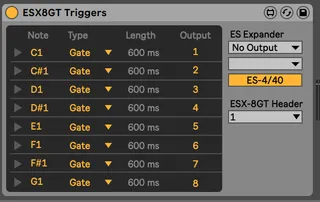
ESX8GT Triggers
Hacked CV Triggers to work with Expert Sleepers ESX-8GT Expa...
- Type
- Instrument
- Author
- bhenry1790
- Version
- 1.0
- License
- None
- Live version
- 10.0.1
- Max version
- 7.3.5
- Downloads
- 435
- Updated
- 2020-12-19
ESX8GT Triggers is an Instrument for Ableton Live by bhenry1790, distributed as freeware, with no license specified by the author. It targets Live 10.0.1 and Max 7.3.5. On maxforlive.com it has 435 downloads. First published 2020-05-04, last updated 2020-12-19. 7 user comments below.
New to Max for Live? Read what Instruments do, how device licenses work, how to install a device.
Description
Hacked CV Triggers to work with Expert Sleepers ESX-8GT Expander.
You'll need to add the es*encoder~ externals to Max for these to work.
https://www.expert-sleepers.co.uk/downloads.html
On a Mac the location for externals (windows will be similar):
Users/Shared/Max 8/Library/
If using with an ES8/9 as an aggregate device turn off DRIFT CORRECTION
Comments (7)
es4encoder~: could not load due to incorrect architecture
es5encoder~: could not load due to incorrect architecture
esx8cvencoder~: could not load due to incorrect architecture
es4encoder~: could not load due to incorrect architecture
es5encoder~: could not load due to incorrect architecture
grids: could not load due to incorrect architecture
try the latest. They should work
https://www.expert-sleepers.co.uk/downloads.html