Backing Tracks
Use arrangement view in Live to prepare your gig (backing tr...
- Type
- Instrument
- Author
- UdoRBrauna
- Version
- 1.0
- License
- AttributionNonCommercial
- Live version
- 10.1
- Max version
- 8.0.4
- Downloads
- 1,085
- Updated
- 2020-05-08
Backing Tracks is an Instrument for Ableton Live by UdoRBrauna, distributed as Creative Commons Attribution-NonCommercial. It targets Live 10.1 and Max 8.0.4. On maxforlive.com it has 1,085 downloads. Published 2020-05-08. 9 user comments below.
New to Max for Live? Read what Instruments do, what the AttributionNonCommercial license means, how to install a device.
Description
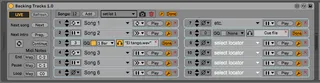
Use arrangement view in Live to prepare your gig (backing tracks, instruments, etc). Using arrangement view to trigger your tracks is more comfortable, because you can have tempo changes in every song like ritardandos, you can rehersal every song comfortably, the songs can be sync with midi and other stuff, etc.
Add a locator at the beggining of each song and then use this patch to select the order (up to 36 songs). So you never have to re-arrange the project.
You can name a locator "end", "loop" or "pause" or use custom midi notes to set the end of the song, a looping part or a pause (public singing, for example).
Set an audio of the song's name and it will reproduce as a cue.
Other functions like global quantization for each song, different "end modes" and "preparation modes" for different purposes. For example: A loop of "x" beats as an intro for the song, or a loop at the end of the song to be able to sustain a note without stopping the playback (because this would cut the note). etc.
Mappable buttons to play each song, next song, only the intro, continue after a "pause" or a "loop" locator.
Possibility to create different setlists and store them within the live project. One project, different setlists.
And finally, a Live mode, so you can clearly see which song comes next.
(Sorry for my english...)
Comments (9)
1. Sometimes when I load a project, it loads without the song names. it shows the select a locator message instead of the actual marker name corresponded to that locator.
2. when I tried to keymap a play button I noticed that the yellow active presentation is still showing even after I let go of the keyboard. and the way to make it go away is to press again the same keymap. this makes the keymap function not work as intended.
3. When I try to MIDI map the play button it all goes worse because it's keeps on launching, again and again, the same midi message
If you could fix these problems I guarantee that this plug-in is it must have!!
yossimor10:
you are right about the midi map thing. The problem is Live's midi map only supports toggle mode, so I will have to try some work arounds.
About the loading problem, this never happened to me, but I will investigate it. For now, I think you can save your setlist snapshot and load it again if it fails. (if no locator name is found, click on the top left "refresh" button)
Thank you for your comments!
If you don't have the time to do it, could you recommend tutorials or give me infos about how could I understand and do this?
Thanks again for all your work and consideration, your work really is a time saver.
Like something that follows navigation between songs, going to the next one or backwards, with colours or just highlighthing the actual song.