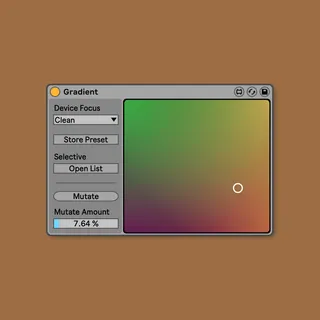
Gradient
Sometimes your best idea is just between two you’ve alread...
- Type
- Audio Effect
- Author
- pATCHES
- Version
- 1.0.1
- License
- Commercial
- Live version
- 10.1.9
- Max version
- 8.1.1
- Downloads
- 0
- Updated
- 2020-05-11
Gradient is an Audio Effect for Ableton Live by pATCHES, distributed as a commercial (paid) device. It targets Live 10.1.9 and Max 8.1.1. First published 2020-05-07, last updated 2020-05-11. 5 user comments below.
New to Max for Live? Read what Audio Effects do, what the Commercial license means, how to install a device.
Description
Sometimes your best idea is just between two you’ve already had. Gradient is like a color picker for device presets in Ableton Live, aiding in your search for magnificent purples between the reds and blues in your existing library. Put in slightly less metaphoric terms, Gradient allows you to discover and design presets for your favorite Live devices, instruments, and VSTs in a new way that’s fun and intuitive.
## Multiply your preset library
Gradient pairs with any device in your Live set, collects all the values of all the parameters in that device in four preset banks, and interpolates any differences in those stored presets based on the position you set in an XY pad.
Gradient’s resolution is approximately 185 x 169, and a new variation awaits at every point of the interface. That’s 3,000+ new preset configurations for every four you feed it, each minutely different from its neighbors to allow you to precisely dial in the full set of parameters.
## VST Friendly
Gradient makes a perfect companion to any plugin in your library. Peruse, discover, edit, and be surprised by presets all at the same time.
One of the coolest features of this approach is that it doesn’t require a deep knowledge of the software to produce inspiring and original results — all you need is at least one patch you already like in order to offer Gradient meaningful input on the kind of instrument or effect you’d like to explore. Imagine creating your own personal kickass Serum presets simply by repurposing and blending the contents of an old pack that’s gone stale.
## Instant, scalable variation
When loading up or dialing in a preset you’re already happy with, chances are there’s still some room for improvement to make it better suited for your precise application. Normally this is a tedious process, especially when it comes to the finer details.
With Gradient, you’re free to tweak settings into several different versions and then blend your ideas globally. You can even slightly randomize some or all parameters by a small or large amount using the Mutate function and temper the results through interpolation.
Comments (5)
Can't wait to give this a whirl.
Every time i try to randomize a preset from VST plugin it takes a long time to load the next preset
Any solution?