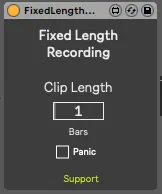
Fixed Length Recording
A small freebie for those who don't have a Push, or want to...
- Type
- Audio Effect
- Author
- Panosla
- Version
- 1.1
- License
- AttributionNonCommercialShareAlike
- Live version
- 10.1.15
- Max version
- 8.1.1
- Downloads
- 5,263
- Updated
- 2020-07-07
Fixed Length Recording is an Audio Effect for Ableton Live by Panosla, distributed as Creative Commons Attribution-NonCommercial-ShareAlike. It targets Live 10.1.15 and Max 8.1.1. On maxforlive.com it has 5,263 downloads. First published 2020-07-04, last updated 2020-07-07. 17 user comments below.
New to Max for Live? Read what Audio Effects do, what the AttributionNonCommercialShareAlike license means, how to install a device.
Description
A small freebie for those who don't have a Push, or want to have hands on control over the recorded clip length on session view
Load one device per track and simply hit record.
Feel free to check the rest of my work.
Note: At this moment, you can set the clip length in bars. This number is valid for 4/4 only. Including other time signatures requires some extra logic, which I haven't patched yet.
Note 2: If you move around tracks, or move the device through tracks, hit the panic button. You need to re-initialize the device in order to work properly.
Changelog
Version 1.1:
Bugfix - Device would not initialize on instantiation
Bugfix - Clip length number would only report value when changed with mouse
Enhancement - Warning dialogues that regards the limitations of the device.
Comments (17)
I am using Live 10.1.2, and Max 8.1.0
Any advice?
great device ! thx
Quick note. Is it possible to also automatically turn off "Session Record" when the clip stops recording as well?
I use a footswitch mapped to the session record button to be able to do hands free looping, and when i start recording with that, when the clip stops recording after the set # of bars the Session Record button remains active and I'm getting a little bleed over while playing midi notes . (yes i should be stopping right at the end of the bar but sometimes i like to play though the end of loop a little... ;)
Note that it works fine for any audio tracks. And it works fine if I hit the record button on the clip itself, but not the session record button
thx in advance
and change to this :
"parameter_initial" : [ 4.0 ],
You should create multiple files with differents value, and use it.