Foldback Distortion
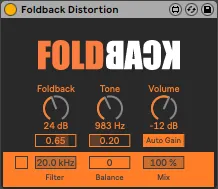
Foldback (Demo) is kind of self-explanatory. It is an m4l fo...
- Type
- Audio Effect
- Author
- Panosla
- Version
- 1.0
- License
- None
- Live version
- 10.1.18
- Max version
- 8.1.5
- Downloads
- 640
- Updated
- 2021-04-13
Foldback Distortion is an Audio Effect for Ableton Live by Panosla, distributed as freeware, with no license specified by the author. It targets Live 10.1.18 and Max 8.1.5. On maxforlive.com it has 640 downloads. Published 2021-04-13.
New to Max for Live? Read what Audio Effects do, how device licenses work, how to install a device.
Description
Foldback (Demo) is kind of self-explanatory. It is an m4l foldback-distortion audio device. Increasing a signal past the 0dBfs mark will cause clipping. The parts that exceed that dynamic range, will be literally clipped and what instead will remain is a flat line. Foldback distortion behaves differently. The part of the signal that exceeds that dynamic range, instead of getting clipped is folded back onto itself.
The closest example to that is as if the waveform is drawn on a piece of paper, and then is folded back onto itself.
The results are heavily dependent on the input material and level, however, drive it too far and some dissonant partials will emerge.
Features
- Foldback parameter - Control the amount of distortion
- LPF filter on the input signal path
- Autogain - A feature that compensates for the level increase when the foldback distortion is -increased.
- Mix - Blend together the input signal and the output signal.
- Balance - Balance the level differences between the input and output. This is particularly useful when you want to automate the mix parameter.
- Crossover/Filter - Use the crossover mode to separate the low frequencies of the input signal and the high frequencies of the output signal. This way you ensure that there will not be any phase issues when the dry signal is mixed with the distorted signal. Especially useful when used with basses.
Best,
Panos