Vox BIG BLCK BLOCK Looper
Based on BLOCKS tools in Max under Package Manager. It is...
- Type
- Audio Effect
- Author
- Sinex5
- Version
- 2.1.0
- License
- None
- Live version
- 9
- Max version
- 7.3.5
- Downloads
- 540
- Updated
- No Updates
Vox BIG BLCK BLOCK Looper is an Audio Effect for Ableton Live by Sinex5, distributed as freeware, with no license specified by the author. It targets Live 9 and Max 7.3.5. On maxforlive.com it has 540 downloads. Published 2020-02-20. 6 user comments below.
New to Max for Live? Read what Audio Effects do, how device licenses work, how to install a device.
Description
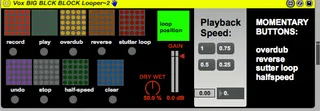
Based on BLOCKS tools in Max under Package Manager.
It is a manually triggered looper similar to the line 6.
I basically ported it to M4L. I added a dry wet and
made things more functional for me like momentary buttons in some parameters and mappable live.buttons. The record button lets you hear at 50% dry wet. While the play goes full 100% wet and undo back to 50%. Download the BLOCK
package and it should work. Press REC once press PLAY once. Stutter is momentary so when you let go of (live button) it stops stuttering. So does Reverse.
Comments (6)
this patch Looper (can't remember exactly what the name is) and you must be able to run that patcher in Max if you are to use this in M4L. The only things I added to that patcher was Live UI and made it more playable to
my tastes. I use it for live jamming since it is NOT clock based.
I hope it works for you.
Any chance it's possible to have 2 devices that sync with each other or multiply feature on one? Great work!
Open some file in Max to see if you can run them from the Package manager page and see if you can open any Blocks patch! If you can run a patch in Max.